
一篇文章讲清楚 React Element、React Component、JSX、Fiber 以及Diff算法的概念及其相互关系
目录 Table of Contents
最近在学习 React 源码的时候,发现好多概念,它们之间还有一些关系。总是容易忘记和弄混,打算写一篇文章记录一下,忘记了就再翻看看看。这次要弄清楚的是
-
React Element
-
React Component
-
JSX
-
Fiber
-
Diff 算法
-
React.createElement
我会先介绍一下以上每一个,然后再通过源码和工具,来理解它们的关系,来我们先看看它们的“自我简介”
它们的“自我简介”
React Element
React Element 是构建 React 应用的最小单元。它是对一个 DOM 元素的轻量级描述,最后都会被转化为纯 JavaScript 对象,React Element 对象包含了几个基本的属性,如:
-
type:表示元素的类型,可以是字符串(如 ‘div’, ‘span’ 等 HTML 元素),也可以是一个 React 组件。
-
props:包含了该元素的属性,以及传递给子元素的数据。
-
key:一个可选的、在兄弟元素之间必须唯一的字符串,用于在重新渲染时帮助识别元素的稳定性。
React Element是不可变的,一旦被创建,你不能改变其内容或属性。如果界面需要更新,React 会创建一个新的 Element,并在必要时通过比较新旧 Elements 来有效地更新 DOM。因此,可以将 React Element 理解为描述界面结构的纯数据结构,它们是虚拟 DOM 的组成部分,用于最终生成真实的 DOM 结构。这种设计使得 React 可以在不直接操作 DOM 的情况下,通过比较和重新渲染 Elements 来高效地更新界面。看一下真实的 React Element:
// <div classname="snail-run">snailRun</div>; // JSX 转化为 React ELement 的对象如下: { '$$typeof': Symbol(react.transitional.element), type: 'div', key: null, props: { classname: 'snail-run', children: 'snailRun' }, _owner: null, _store: {} }React Component
React Component 是构成 React 应用的独立、可复用的代码块。它们本质上是返回 React Element的 JavaScript 函数或类。组件可以接受输入(称为 props),并返回React Element。组件分为两种类型:函数组件和类组件,函数组件通常更简洁,支持 Hooks。它还可以作为 React.createElement的第一个参数,也就是 type 字段。我们日常开发 React 项目,写的最多的也就是 React Component,给大家写一下最简单的函数组件和类组件:
// 函数组件 function AppFunc() { // 可以使用 react hooks return <div>snailRun</div>; } // 类组件 class AppClass extends React.Component { render() { return <div>snailRun</div>; } }JSX
JSX是一种语法扩展(语法糖),看起来很像 XML或 HTML。JSX提供了一种更直观的方式来描述UI,它让开发者可以在 JavaScript代码中写标签语言。在编译过程中,JSX会被转换成标准的JavaScript对象,即 React Elements,JSX 示例代码:
<div classname="name">snailRun</div>Fiber
Fiber 是一种新的内部架构,用于增强 React 的能力,特别是在动画、布局和中断渲染方面。Fiber架构首次在 React 16中引入,目的是解决以前版本 React 递归更新过程不能中断的问题,它能够将渲染工作分解成小的单元,每完成一小部分工作后,就能将控制权交回给浏览器,让浏览器处理如动画、布局、输入响应等其他工作。这种能力被称为“可中断渲染”。Fiber 作为静态数据结构来讲,存储着很多信息,和 JSX 数据结构很相似,但是它存储更多内容。它本质上是一个工作单元的抽象,它代表 React 在构建和更新 DOM 时需要完成的工作。每一个 React Element 都对应一个 Fiber 节点,整个应用的结构可以被看作一个巨大的 Fiber 树。
Diff 算法
当组件的状态或属性发生变化时,React 需要决定是否更新 DOM。React 使用** Diff 算法**来比较新旧两个 fiber 树并标记标记那些需要进行添加、删除或更新的 Fiber 节点并确定优先级,最后提交更改到 DOM,这个过程称为 Reconciliation(协调)。
Diff 算法会识别出需要进行更新的部分,并生成相应的操作来更新 DOM。这种方法确保了只有实际改变的部分才会被重新渲染,从而优化了性能。
小知识 >> 首屏渲染和更新的区别是:在创建 fiber 树的过程中,是否有diff算法
看看源码
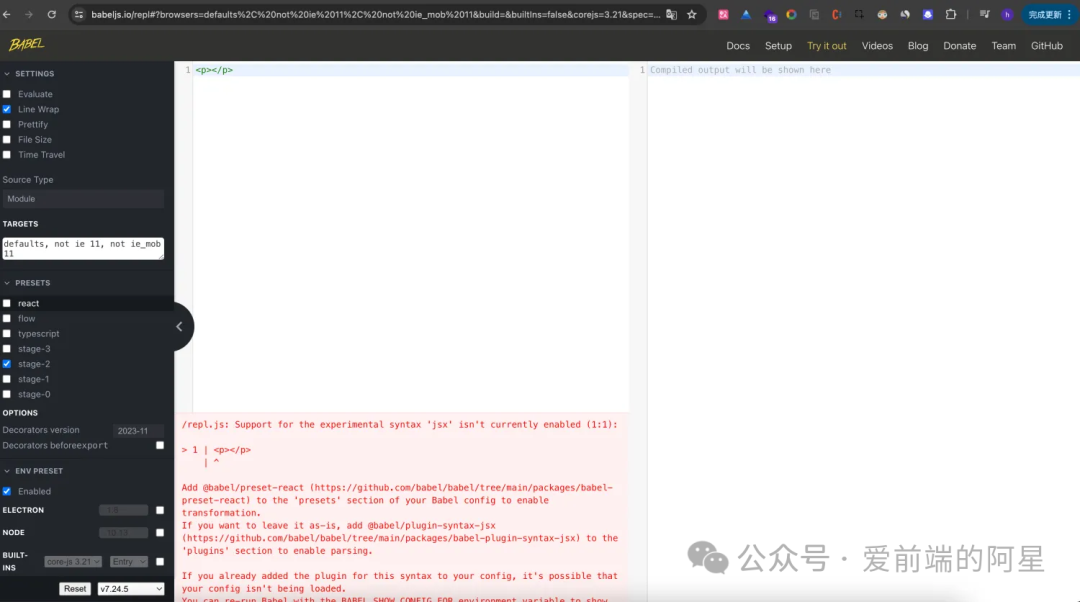
想要了解这些名词和它们之间的关系,我们需要借助一个 JavaScript 编译器 babel:https://babeljs.io/,来看看 JSX 的编译结果。首先我们不添加任何插件,去掉 React 预设,来写一段 JSX 代码,我们可以看到报错了,因为本来JavaScript 不知道如何编译 JSX 的。
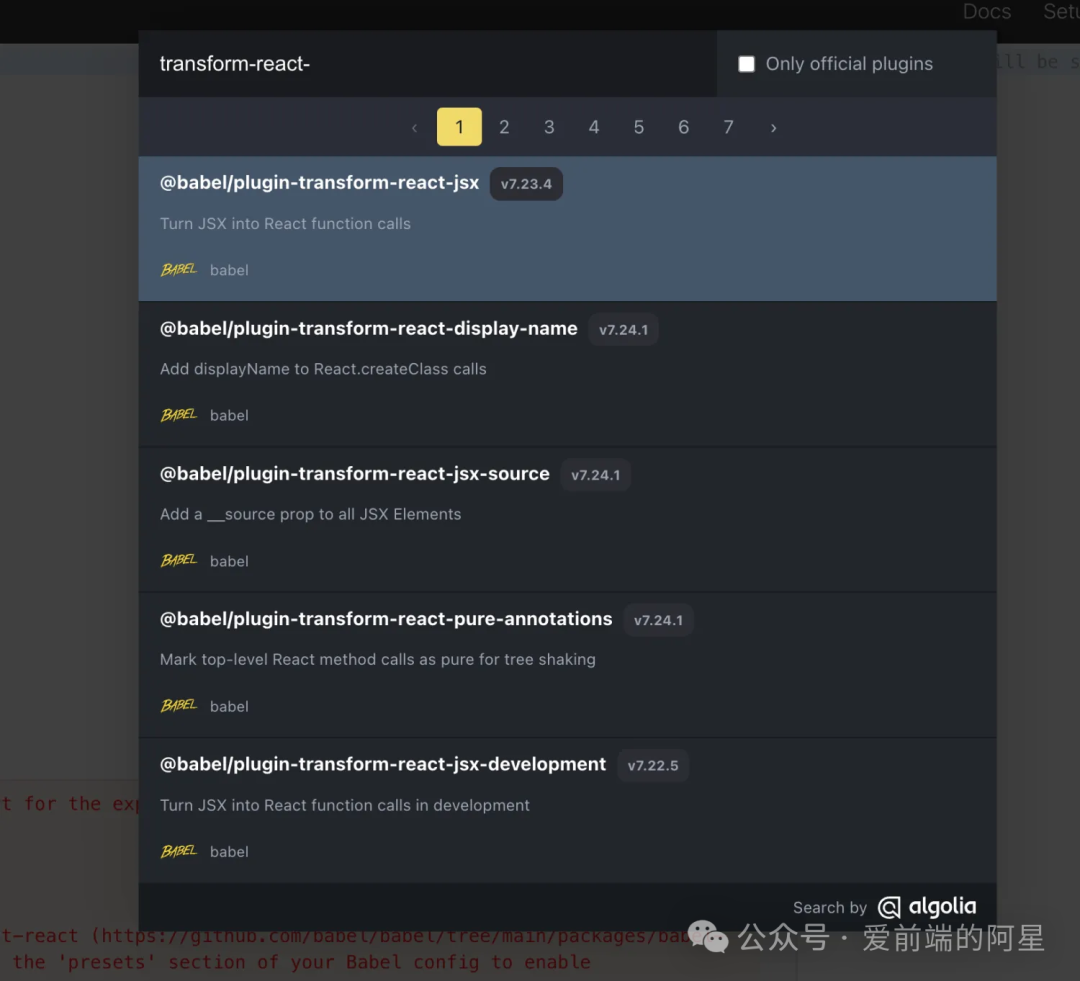
我们这时候滑动左边到底部点击 add plugin ,添加一个 transform-react-jsx插件。
我们可以看到,JSX 语法被成功编译,我们的左侧就被编译成为了右侧,它的结果就是 JSX 的结果:
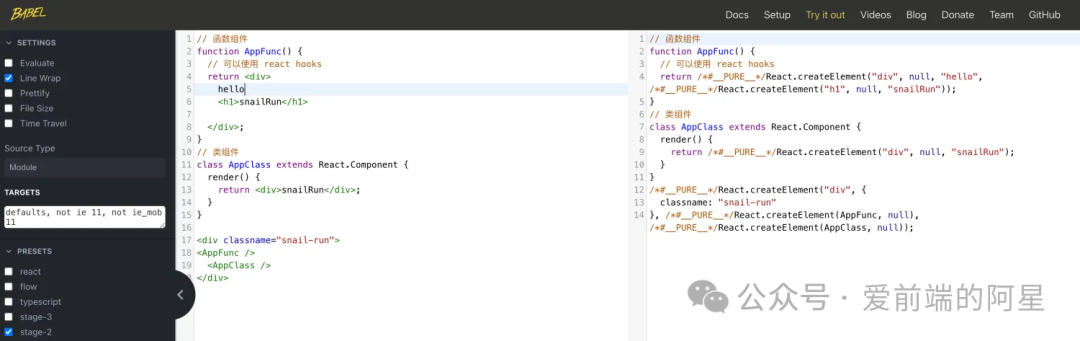
那我们现在来看看编译后的这个代码的结果是什么?也就是React.createElement做了什么?我帮大家找到了 React 源码中 React.createElement的实现,也就是下面这段代码:
/** * Create and return a new ReactElement of the given type. * See https://reactjs.org/docs/react-api.html#createelement */export function createElement(type, config, children) {  if (__DEV__) {    if (!isValidElementType(type)) {      // This is an invalid element type.      //      // We warn in this case but don't throw. We expect the element creation to      // succeed and there will likely be errors in render.      let info = '';      if (        type === undefined ||        (typeof type === 'object' &&          type !== null &&          Object.keys(type).length === 0)      ) {        info +=          ' You likely forgot to export your component from the file ' +          "it's defined in, or you might have mixed up default and named imports.";      }
      let typeString;      if (type === null) {        typeString = 'null';      } else if (isArray(type)) {        typeString = 'array';      } else if (type !== undefined && type.$$typeof === REACT_ELEMENT_TYPE) {        typeString = `<${getComponentNameFromType(type.type) || 'Unknown'} />`;        info =          ' Did you accidentally export a JSX literal instead of a component?';      } else {        typeString = typeof type;      }
      console.error(        'React.createElement: type is invalid -- expected a string (for ' +          'built-in components) or a class/function (for composite ' +          'components) but got: %s.%s',        typeString,        info      );    } else {      // This is a valid element type.
      // Skip key warning if the type isn't valid since our key validation logic      // doesn't expect a non-string/function type and can throw confusing      // errors. We don't want exception behavior to differ between dev and      // prod. (Rendering will throw with a helpful message and as soon as the      // type is fixed, the key warnings will appear.)      for (let i = 2; i < arguments.length; i++) {        validateChildKeys(arguments[i], type);      }    }
    // Unlike the jsx() runtime, createElement() doesn't warn about key spread.  }
  let propName;
  // Reserved names are extracted  const props = {};
  let key = null;  let ref = null;
  if (config != null) {    if (__DEV__) {      if (        !didWarnAboutOldJSXRuntime &&        '__self' in config &&        // Do not assume this is the result of an oudated JSX transform if key        // is present, because the modern JSX transform sometimes outputs        // createElement to preserve precedence between a static key and a        // spread key. To avoid false positive warnings, we never warn if        // there's a key.        !('key' in config)      ) {        didWarnAboutOldJSXRuntime = true;        console.warn(          'Your app (or one of its dependencies) is using an outdated JSX ' +            'transform. Update to the modern JSX transform for ' +            'faster performance: https://react.dev/link/new-jsx-transform'        );      }    }
    if (hasValidRef(config)) {      if (!enableRefAsProp) {        ref = config.ref;        if (!disableStringRefs) {          ref = coerceStringRef(ref, getOwner(), type);        }      }
      if (__DEV__ && !disableStringRefs) {        warnIfStringRefCannotBeAutoConverted(config, config.__self);      }    }    if (hasValidKey(config)) {      if (__DEV__) {        checkKeyStringCoercion(config.key);      }      key = '' + config.key;    }
    // Remaining properties are added to a new props object    for (propName in config) {      if (        hasOwnProperty.call(config, propName) &&        // Skip over reserved prop names        propName !== 'key' &&        (enableRefAsProp || propName !== 'ref') &&        // Even though we don't use these anymore in the runtime, we don't want        // them to appear as props, so in createElement we filter them out.        // We don't have to do this in the jsx() runtime because the jsx()        // transform never passed these as props; it used separate arguments.        propName !== '__self' &&        propName !== '__source'      ) {        if (enableRefAsProp && !disableStringRefs && propName === 'ref') {          props.ref = coerceStringRef(config[propName], getOwner(), type);        } else {          props[propName] = config[propName];        }      }    }  }
  // Children can be more than one argument, and those are transferred onto  // the newly allocated props object.  const childrenLength = arguments.length - 2;  if (childrenLength === 1) {    props.children = children;  } else if (childrenLength > 1) {    const childArray = Array(childrenLength);    for (let i = 0; i < childrenLength; i++) {      childArray[i] = arguments[i + 2];    }    if (__DEV__) {      if (Object.freeze) {        Object.freeze(childArray);      }    }    props.children = childArray;  }
  // Resolve default props  if (type && type.defaultProps) {    const defaultProps = type.defaultProps;    for (propName in defaultProps) {      if (props[propName] === undefined) {        props[propName] = defaultProps[propName];      }    }  }  if (__DEV__) {    if (key || (!enableRefAsProp && ref)) {      const displayName =        typeof type === 'function'          ? type.displayName || type.name || 'Unknown'          : type;      if (key) {        defineKeyPropWarningGetter(props, displayName);      }      if (!enableRefAsProp && ref) {        defineRefPropWarningGetter(props, displayName);      }    }  }
  const element = ReactElement(    type,    key,    ref,    undefined,    undefined,    getOwner(),    props  );
  if (type === REACT_FRAGMENT_TYPE) {    validateFragmentProps(element);  }
  return element;}
现在让我来简单解释一下这段代码:
参数说明:
-
type:元素的类型,可以是 HTML 标签的字符串,或者是一个 React 组件( 函数组件 和 类组件)
-
config:一个配置对象,包含了元素的属性(props),可能还包括特殊属性如 key 和 ref。
-
children:子元素,可以是任意数量的参数,表示元素的子节点。
示例:React.createElement("div", {classname: "snail-run"}, "snailRun");
主要逻辑:
-
类型验证:首先检查 type 是否有效。如果无效,会在控制台输出错误信息。有效性检查包括是否未定义、是否为空对象、是否为数组等情况。
-
处理配置对象(config):
-
处理 ref:如果配置对象中有 ref 属性,并且当前环境允许 ref 作为属性,那么将其添加到新的 props 对象中。
-
处理 key:如果配置对象中有 key 属性,将其转换为字符串并存储。
-
复制其他属性:将
config对象中的其他属性复制到新的 props 对象中,忽略key、ref、__self和__source等特殊或保留属性。
- 处理子元素:
-
如果只有一个子元素,直接将其赋值给
props.children。 -
如果有多个子元素,将它们放入一个数组中,并赋值给
props.children。
-
处理默认属性:如果类型 type 有默认属性(
defaultProps),则将未在 props 中显式设置的属性填充为默认值。 -
创建 React Element:使用
ReactElement函数创建一个新的 React 元素,传入type、key、ref、props等参数。 -
特殊类型处理:如果 type 是
Fragment类型,还会对Fragment的属性进行验证。
开发与生产环境的差异
代码中多次出现__DEV__的条件编译指令,这是用来区分开发环境和生产环境的。在开发环境中,会进行更多的警告和错误检查,以帮助开发者发现潜在问题。
总结:
-
createElement函数接受参数后,通过校验参数和处理,最后返回了ReactElement,也就是说 JSX 编译得到的结果是ReactElement, -
**JSX **是写 React 组件时用来声明元素的语法糖,本质是
React.createElement,最终 JSX 被转换成React Element。
它们的关系
-
JSX 与 React Element 的关系:
JSX是JavaScript的语法扩展,看起来很像HTML。开发者通常使用JSX来描述UI结构。当JSX被编译时,它会被转换成React Element。因此,可以认为JSX是创建React Element的语法糖。 -
React Element 与 React Component 的关系:
React Element是React应用中最小的构建块,它是对组件输出的轻量级描述。React Component则是封装了逻辑和状态的独立单元,它返回React Element。因此,组件是创建和管理元素的容器。 -
React Element 和 Fiber 节点的关系:每个
React Element在内部对应一个Fiber节点,这些节点是实际执行工作的单位。 -
React Component 和 Fiber 的关系:在
React 16版本中引入了Fiber架构,这是一种新的协调算法,用于提高应用的性能和响应性。每个React Component在渲染时都会对应一个或多个Fiber节点。React中的一个工作单元通常是一个Fiber节点,React通过这些工作单元来构建和更新虚拟DOM。 -
Diff 算法比较 Element 变化:当组件的状态或属性变化时,
React会使用Diff算法比较旧的和新的React Element,确定哪些需要更新。 -
Fiber 与 Diff 算法的关系:
Diff算法是React中用于对比新旧虚拟 DOM 的差异,并决定如何有效更新真实 DOM 的过程。在Fiber架构中,Diff算法被用于确定哪些Fiber节点需要变更、哪些可以保留。Fiber架构使得React可以中断和恢复Diff过程,允许任务按优先级进行,从而优化性能。 -
整体流程:当组件的状态或属性发生变化时,
React会重新执行 通过JSX(React.createElement语法糖) 创建的组件(React Component)的渲染函数,生成新的React Element。然后,React使用 Diff 算法对比新旧元素,通过** Fiber 架构**将这些变更分解成多个小任务,逐步执行这些任务,生成新的fiber树,最终将变更反映到真实的DOM上。
总结来说,JSX 提供了一种声明式的语法来生成 React Element / React Component(函数组件 or 类组件),这些元素是由 React Component 输出的。React Component 通过 Fiber 架构管理其生命周期和状态变化,而 Fiber 架构内部使用** Diff 算法**来优化更新过程。这些概念共同工作,使得 React 能够高效且灵活地构建用户界面。