
One article to clarify the concepts of React Element, React Component, JSX, Fiber, and the Diff algorithm, and their interrelationships.
Table of Contents 目录
Recently, while studying the React source code, I came across many concepts that have relationships with each other. I always tend to forget or confuse them, so I decided to write this article to document them — when I forget, I can just flip back and look. This time I want to clarify:
-
React Element
-
React Component
-
JSX
-
Fiber
-
Diff algorithm
-
React.createElement
I’ll first introduce each of the above, then use source code and tools to understand how they relate. Let’s start with their “self-introductions”.
Their “Self-Introductions”
React Element
React Element is the smallest building block of a React application. It is a lightweight description of a DOM element, and will ultimately be converted into a plain JavaScript object. A React Element object contains several basic properties, such as:
-
type: indicates the type of the element. It can be a string (like'div','span'for HTML elements) or a React component. -
props: contains the element’s attributes and data passed to child elements. -
key: an optional string that must be unique among siblings, used to help identify element stability during re-rendering.
React Elements are immutable — once created, you cannot change their content or attributes. If the UI needs to update, React creates a new Element and, when necessary, efficiently updates the DOM by comparing the old and new Elements. So you can think of React Elements as plain data structures that describe the UI structure; they are the building blocks of the virtual DOM, which ultimately produces real DOM. This design allows React to efficiently update the UI by comparing and re-rendering Elements without directly manipulating the DOM. Let’s look at a real React Element:
// <div className="snail-run">snailRun</div>;// JSX converted to a React Element object looks like:{ '$$typeof': Symbol(react.transitional.element), type: 'div', key: null, props: { className: 'snail-run', children: 'snailRun' }, _owner: null, _store: {}}React Component
React Component is an independent, reusable piece of code that makes up a React application. They are essentially JavaScript functions or classes that return React Elements. Components can accept input (called props) and return React Elements. There are two types: function components and class components. Function components are usually more concise and support Hooks. A component can also be the first argument to React.createElement, i.e., the type field. In our daily React development, we write React Components the most. Here’s a simple example of a function component and a class component:
// Function componentfunction AppFunc() {  // can use React hooks  return <div>snailRun</div>;}
// Class componentclass AppClass extends React.Component {  render() {    return <div>snailRun</div>;  }}
JSX
JSX is a syntax extension (syntactic sugar) that looks a lot like XML or HTML. JSX provides a more intuitive way to describe UIs, allowing developers to write markup language in JavaScript. During compilation, JSX is transformed into standard JavaScript objects, i.e., React Elements. Example JSX code:
<div className="name">snailRun</div>Fiber
Fiber is a new internal architecture introduced to enhance React’s capabilities, especially in areas like animations, layout, and interruptible rendering. The Fiber architecture was first introduced in React 16 to address the issue that the recursive update process in previous versions could not be interrupted. It breaks down rendering work into small units; after completing a small chunk of work, it yields control back to the browser, allowing it to handle other tasks like animations, layout, and input responses. This ability is called “interruptible rendering.” As a static data structure, Fiber stores a lot of information — it’s quite similar to the JSX data structure, but it contains much more. Essentially, it is an abstraction of a unit of work — it represents the work React needs to do when building and updating the DOM. Every React Element corresponds to a Fiber node, and the entire application structure can be seen as a huge Fiber tree.
Diff Algorithm
When a component’s state or props change, React needs to decide whether to update the DOM. React uses the Diff algorithm to compare the old and new fiber trees, mark Fiber nodes that need to be added, removed, or updated, determine priorities, and finally commit the changes to the DOM. This process is called Reconciliation.
The Diff algorithm identifies which parts need updating and generates the corresponding operations to update the DOM. This approach ensures that only the parts that actually changed get re-rendered, optimizing performance.
Small nugget >> The difference between initial render and updates is: whether the diff algorithm runs during the creation of the fiber tree.
Let’s Look at the Source Code
To understand these terms and their relationships, we need a JavaScript compiler: Babel. Let’s see what JSX gets compiled into. First, without adding any plugins and removing the React preset, write a piece of JSX code — we’ll see an error because JavaScript doesn’t know how to compile JSX natively.
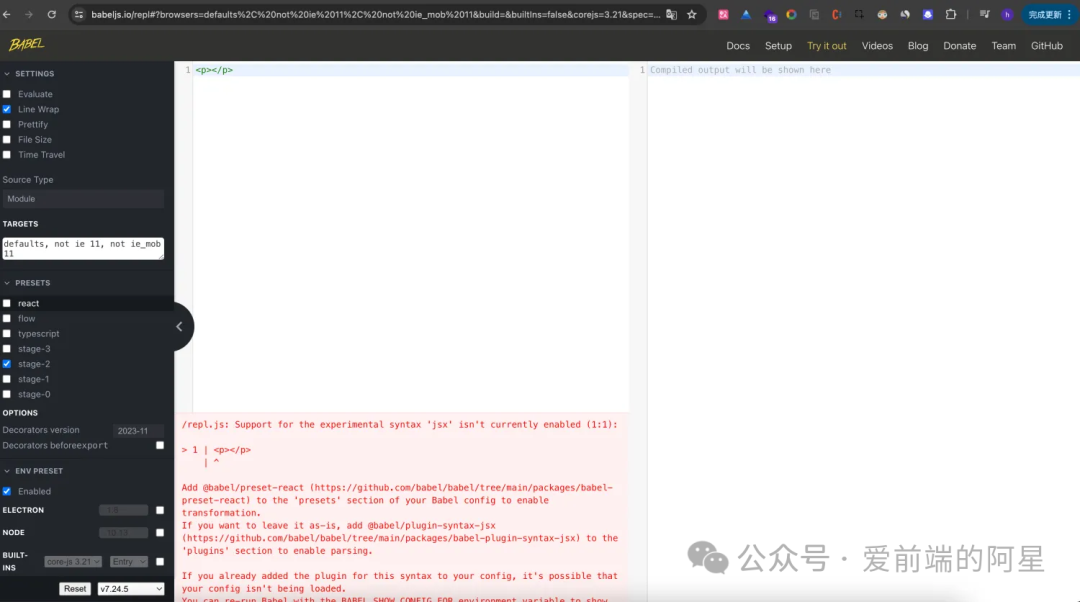
Now scroll to the bottom on the left, click add plugin, and add the transform-react-jsx plugin.
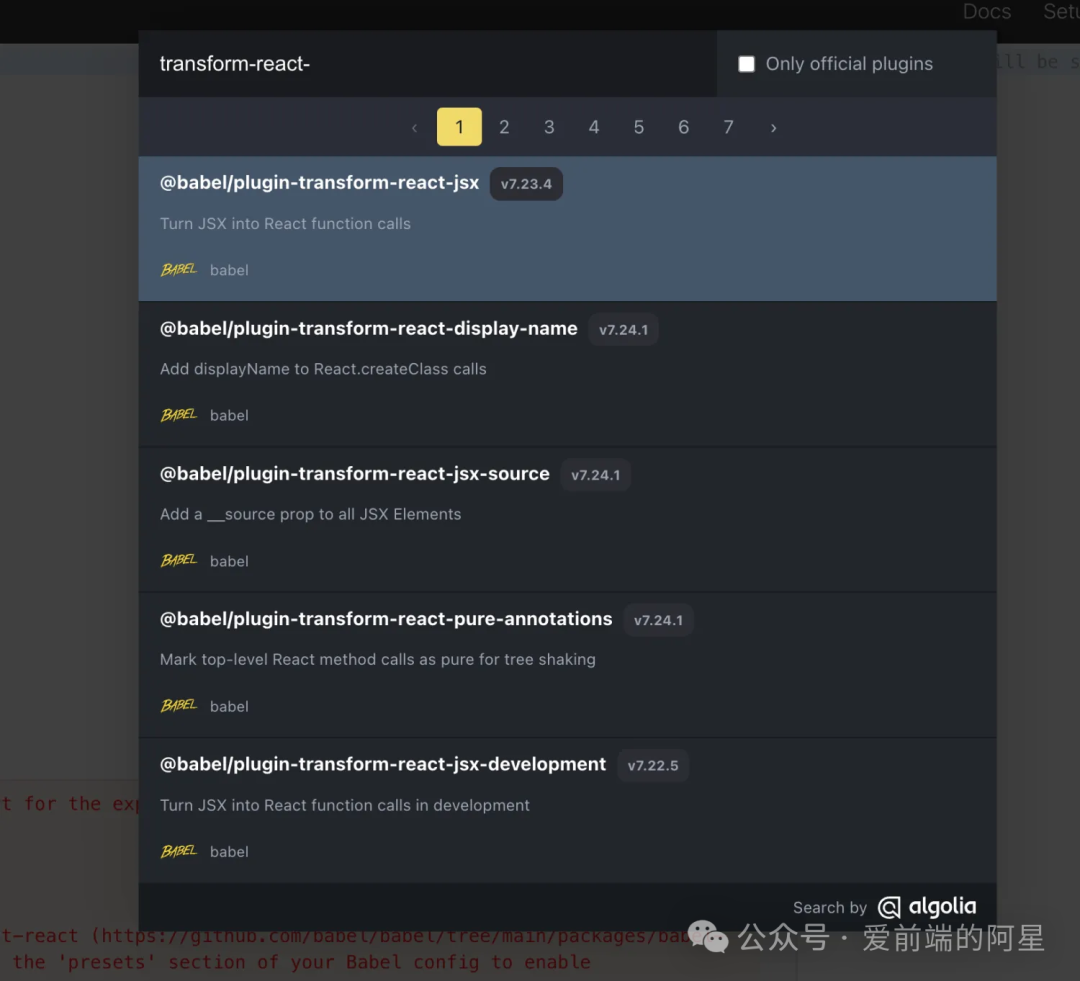
We can see that the JSX syntax is successfully compiled. The left side compiles into the right side — that’s the result of JSX:
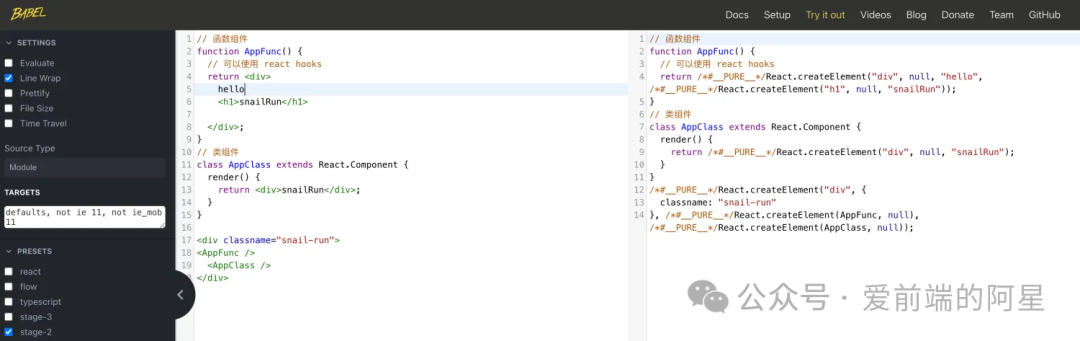
Now let’s see what this compiled code actually produces? In other words, what does React.createElement do? I found the implementation of React.createElement in the React source code, which is the code below:
/** * Create and return a new ReactElement of the given type. * See https://reactjs.org/docs/react-api.html#createelement */export function createElement(type, config, children) {  if (__DEV__) {    if (!isValidElementType(type)) {      // This is an invalid element type.      //      // We warn in this case but don't throw. We expect the element creation to      // succeed and there will likely be errors in render.      let info = '';      if (        type === undefined ||        (typeof type === 'object' &&          type !== null &&          Object.keys(type).length === 0)      ) {        info +=          ' You likely forgot to export your component from the file ' +          "it's defined in, or you might have mixed up default and named imports.";      }
      let typeString;      if (type === null) {        typeString = 'null';      } else if (isArray(type)) {        typeString = 'array';      } else if (type !== undefined && type.$$typeof === REACT_ELEMENT_TYPE) {        typeString = `<${getComponentNameFromType(type.type) || 'Unknown'} />`;        info =          ' Did you accidentally export a JSX literal instead of a component?';      } else {        typeString = typeof type;      }
      console.error(        'React.createElement: type is invalid -- expected a string (for ' +          'built-in components) or a class/function (for composite ' +          'components) but got: %s.%s',        typeString,        info      );    } else {      // This is a valid element type.
      // Skip key warning if the type isn't valid since our key validation logic      // doesn't expect a non-string/function type and can throw confusing      // errors. We don't want exception behavior to differ between dev and      // prod. (Rendering will throw with a helpful message and as soon as the      // type is fixed, the key warnings will appear.)      for (let i = 2; i < arguments.length; i++) {        validateChildKeys(arguments[i], type);      }    }
    // Unlike the jsx() runtime, createElement() doesn't warn about key spread.  }
  let propName;
  // Reserved names are extracted  const props = {};
  let key = null;  let ref = null;
  if (config != null) {    if (__DEV__) {      if (        !didWarnAboutOldJSXRuntime &&        '__self' in config &&        // Do not assume this is the result of an oudated JSX transform if key        // is present, because the modern JSX transform sometimes outputs        // createElement to preserve precedence between a static key and a        // spread key. To avoid false positive warnings, we never warn if        // there's a key.        !('key' in config)      ) {        didWarnAboutOldJSXRuntime = true;        console.warn(          'Your app (or one of its dependencies) is using an outdated JSX ' +            'transform. Update to the modern JSX transform for ' +            'faster performance: https://react.dev/link/new-jsx-transform'        );      }    }
    if (hasValidRef(config)) {      if (!enableRefAsProp) {        ref = config.ref;        if (!disableStringRefs) {          ref = coerceStringRef(ref, getOwner(), type);        }      }
      if (__DEV__ && !disableStringRefs) {        warnIfStringRefCannotBeAutoConverted(config, config.__self);      }    }    if (hasValidKey(config)) {      if (__DEV__) {        checkKeyStringCoercion(config.key);      }      key = '' + config.key;    }
    // Remaining properties are added to a new props object    for (propName in config) {      if (        hasOwnProperty.call(config, propName) &&        // Skip over reserved prop names        propName !== 'key' &&        (enableRefAsProp || propName !== 'ref') &&        // Even though we don't use these anymore in the runtime, we don't want        // them to appear as props, so in createElement we filter them out.        // We don't have to do this in the jsx() runtime because the jsx()        // transform never passed these as props; it used separate arguments.        propName !== '__self' &&        propName !== '__source'      ) {        if (enableRefAsProp && !disableStringRefs && propName === 'ref') {          props.ref = coerceStringRef(config[propName], getOwner(), type);        } else {          props[propName] = config[propName];        }      }    }  }
  // Children can be more than one argument, and those are transferred onto  // the newly allocated props object.  const childrenLength = arguments.length - 2;  if (childrenLength === 1) {    props.children = children;  } else if (childrenLength > 1) {    const childArray = Array(childrenLength);    for (let i = 0; i < childrenLength; i++) {      childArray[i] = arguments[i + 2];    }    if (__DEV__) {      if (Object.freeze) {        Object.freeze(childArray);      }    }    props.children = childArray;  }
  // Resolve default props  if (type && type.defaultProps) {    const defaultProps = type.defaultProps;    for (propName in defaultProps) {      if (props[propName] === undefined) {        props[propName] = defaultProps[propName];      }    }  }  if (__DEV__) {    if (key || (!enableRefAsProp && ref)) {      const displayName =        typeof type === 'function'          ? type.displayName || type.name || 'Unknown'          : type;      if (key) {        defineKeyPropWarningGetter(props, displayName);      }      if (!enableRefAsProp && ref) {        defineRefPropWarningGetter(props, displayName);      }    }  }
  const element = ReactElement(    type,    key,    ref,    undefined,    undefined,    getOwner(),    props  );
  if (type === REACT_FRAGMENT_TYPE) {    validateFragmentProps(element);  }
  return element;}
Now let me briefly explain this code:
Parameter explanation:
-
type: The type of the element. It can be a string for HTML tags, or a React component (function component or class component). -
config: A configuration object containing the element’s attributes (props), possibly including special attributes likekeyandref. -
children: Child elements, which can be any number of arguments representing the element’s child nodes.
Example: React.createElement("div", { className: "snail-run" }, "snailRun");
Main logic:
-
Type validation: First check whether
typeis valid. If invalid, an error is logged to the console. Validity checks include cases where it’s undefined, an empty object, an array, etc. -
Handle the config object:
-
Handle
ref: If the config object has arefproperty and the current environment allowsrefas a prop, add it to the new props object. -
Handle
key: If the config object has akeyproperty, convert it to a string and store it. -
Copy other properties: Copy other properties from the
configobject into the new props object, skipping special or reserved properties likekey,ref,__self, and__source.
-
-
Handle children:
-
If there is only one child, assign it directly to
props.children. -
If there are multiple children, put them into an array and assign it to
props.children.
-
-
Handle default props: If the type has
defaultProps, fill in any props that are not explicitly set with the defaults. -
Create React Element: Use the
ReactElementfunction to create a new React element, passingtype,key,ref,props, etc. -
Special type handling: If the type is
Fragment, validate the Fragment’s props.
Differences between development and production
The code uses __DEV__ conditional compilation directives multiple times to distinguish between development and production environments. In development, more warnings and error checks are performed to help developers spot potential issues.
Summary:
-
The
createElementfunction takes parameters, validates and processes them, and finally returns aReactElement. This means that JSX compiles down toReactElement. -
JSX is the syntactic sugar for declaring elements when writing React components. Under the hood, it’s
React.createElement, and ultimately JSX is converted intoReact Elements.
Their Relationships
-
Relationship between JSX and React Element:
JSXis a syntax extension forJavaScriptthat looks a lot likeHTML. Developers usually useJSXto describeUIstructures. WhenJSXis compiled, it is transformed intoReact Elements. Therefore,JSXcan be considered syntactic sugar for creatingReact Elements. -
Relationship between React Element and React Component:
React Elementis the smallest building block in aReactapplication — a lightweight description of a component’s output.React Componentis an independent unit that encapsulates logic and state, and it returnsReact Elements. So, components are containers that create and manage elements. -
Relationship between React Element and Fiber node: Each
React Elementcorresponds internally to aFibernode, and these nodes are the actual units of work. -
Relationship between React Component and Fiber: In
React 16, theFiberarchitecture was introduced — a new reconciliation algorithm to improve performance and responsiveness. EveryReact Component, when rendered, corresponds to one or moreFibernodes. A unit of work inReactis usually aFibernode, andReactuses these units of work to build and update the virtualDOM. -
Diff algorithm compares Element changes: When a component’s state or props change,
Reactuses theDiffalgorithm to compare the old and newReact Elementsand determine which parts need updating. -
Relationship between Fiber and Diff algorithm: The
Diffalgorithm is the process inReactthat compares the differences between the old and new virtual DOM, and decides how to efficiently update the real DOM. In theFiberarchitecture, theDiffalgorithm is used to determine whichFibernodes need to change and which can be kept. TheFiberarchitecture allowsReactto interrupt and resume theDiffprocess, enabling tasks to run by priority and thus optimizing performance. -
Overall flow: When a component’s state or props change,
Reactre-executes the render function of the component (React Component) that was created viaJSX(the syntactic sugar forReact.createElement), generating newReact Elements. Then,Reactuses the Diff algorithm to compare the old and new elements. Through Fiber architecture, these changes are broken down into small tasks, executed step by step, to produce a newFibertree, and finally reflect the changes to the realDOM.
In summary, JSX provides a declarative syntax for generating React Elements / React Components (function components or class components), and these elements are output by React Components. React Components manage their lifecycle and state changes through the Fiber architecture, and inside the Fiber architecture, the Diff algorithm is used to optimize the update process. These concepts work together to allow React to efficiently and flexibly build user interfaces.
References
-
React Technical Secrets: https://react.iamkasong.com/preparation/jsx.html#jsx-%E7%AE%80%E4%BB%8B