
Frontend Learning Roadmap (Self-Study)
Table of Contents 目录
First, I suggest watching these two videos by Yupi + how to learn technical articles:
- https://bcdh.yuque.com/staff-wpxfif/resource/rito86b49l53w1w2 (Frontend 1 hour - 1 hour 16 min)
- https://www.bilibili.com/video/BV1nh411e7oG, a super detailed frontend learning roadmap
- https://bcdh.yuque.com/staff-wpxfif/resource/nxkhhu
- https://www.bilibili.com/video/BV1Ax4y1m72q
Let me share the path for a beginner to become a frontend developer. Think of learning frontend development as building a house.
Course features: I’ll recommend both video and text tutorials, so whether you prefer videos or text, you can learn painlessly (I suggest gradually transitioning to text tutorials as you go).
Learning goals:
- Build a website and publish it to the internet
- Write a good resume and land a satisfactory job
Set Up Your Frontend Development Environment
A craftsman must first sharpen his tools. So setting up a good development environment can make learning more efficient.
Editor: (VSCode recommended)
- Visual Studio Code: A lightweight but powerful source code editor that supports Windows, macOS, and Linux. It has built-in support for JavaScript, TypeScript, and Node.js, and supports more languages and runtime environments through a rich extension ecosystem.
- WebStorm: A powerful commercial IDE developed by JetBrains, designed for the modern JavaScript ecosystem, supporting frontend frameworks and libraries like React, Angular, and Vue.js. It provides advanced features such as code completion, refactoring, a powerful debugger, and tight integration with various build tools and version control systems to enhance web development efficiency and experience.
Browser: (Chrome recommended)
- Edge: Microsoft’s Chromium-based browser
- Firefox: Mozilla’s browser
- Chrome: Google’s browser — the most recommended
Version Control Tool Git and Code Hosting Platform GitHub
Git and GitHub are like a library management system and a library: Git manages code, GitHub stores code. Before you actually start writing code, I suggest you first get to know Git and GitHub. Learn Git basics, grasp version control concepts and basic operations.
- Video tutorial: https://www.bilibili.com/video/BV1HM411377j
- Text tutorial: https://www.bookstack.cn/read/git-tutorial/README.md
Use GitHub for code hosting and collaborative development:
- Video tutorial: https://www.bilibili.com/video/BV1hS4y1S7wL
- Text tutorial: https://docs.github.com/en/get-started
If you have time, it’s best to also go through these two tutorials:
- SSH, the login tool for Linux systems: https://wangdoc.com/ssh
- Basic usage and shell scripting of Linux command-line Bash: https://wangdoc.com/bash
Why learn Git and GitHub first? Because the learning process is all about continuously writing code. Having a tool that records every line of code you write not only helps when job hunting — others can quickly see your commit history — but also lets you clearly feel your progress each day after you commit, giving you a strong sense of accomplishment.
The Three Pillars of Frontend
HTML
Builds the structure of a webpage. Think of it as the framework of a house.
- Video tutorial: https://www.bilibili.com/video/BV14J4114768/?vd_source=ce628a5bd43df277d141676215ef5ff3
- Article tutorial: https://wangdoc.com/html/intro
Related resources:
- MDN: https://developer.mozilla.org/en-US/docs/Learn/HTML
- Runoob Tutorial: https://www.runoob.com/html/html-tutorial.html
Start learning from the basic tags, and make sure to write a lot of code so you have some impression of each tag. Stuck in development? Use AI tools to ask questions. Recommended AI tools (won’t repeat later):
- Yucongming AI: yucongming.com
- devv.ai — an AI tool better suited for programmers
- Tongyi Qianwen (also has corresponding VSCode and WebStorm plugins)
CSS
Styles the webpage, including layout, color, fonts, etc. Think of it as the interior and exterior decoration of a house.
- Video tutorial: https://www.bilibili.com/video/BV14J4114768/?vd_source=ce628a5bd43df277d141676215ef5ff3
- Article tutorial: https://www.runoob.com/css/css-tutorial.html
Related resources:
- A CSS specification and code style guide: https://github.com/chadluo/CSS-Guidelines
CSS is actually quite complex. During learning, you don’t need to memorize everything — just get a rough impression. Later, when you encounter a problem, you’ll know which property to use. After you’ve finished learning HTML and CSS sequentially, take a break and test whether you’ve truly mastered the material. Here are two tasks:
- Play through the freeCodeCamp【Responsive Web Design Certification】like a game.
- Build a static website entirely on your own without watching video tutorials (e.g., clone JD.com’s PC homepage). Check out this pure HTML + CSS website with many GitHub stars: https://github.com/codewithsadee/vcard-personal-portfolio
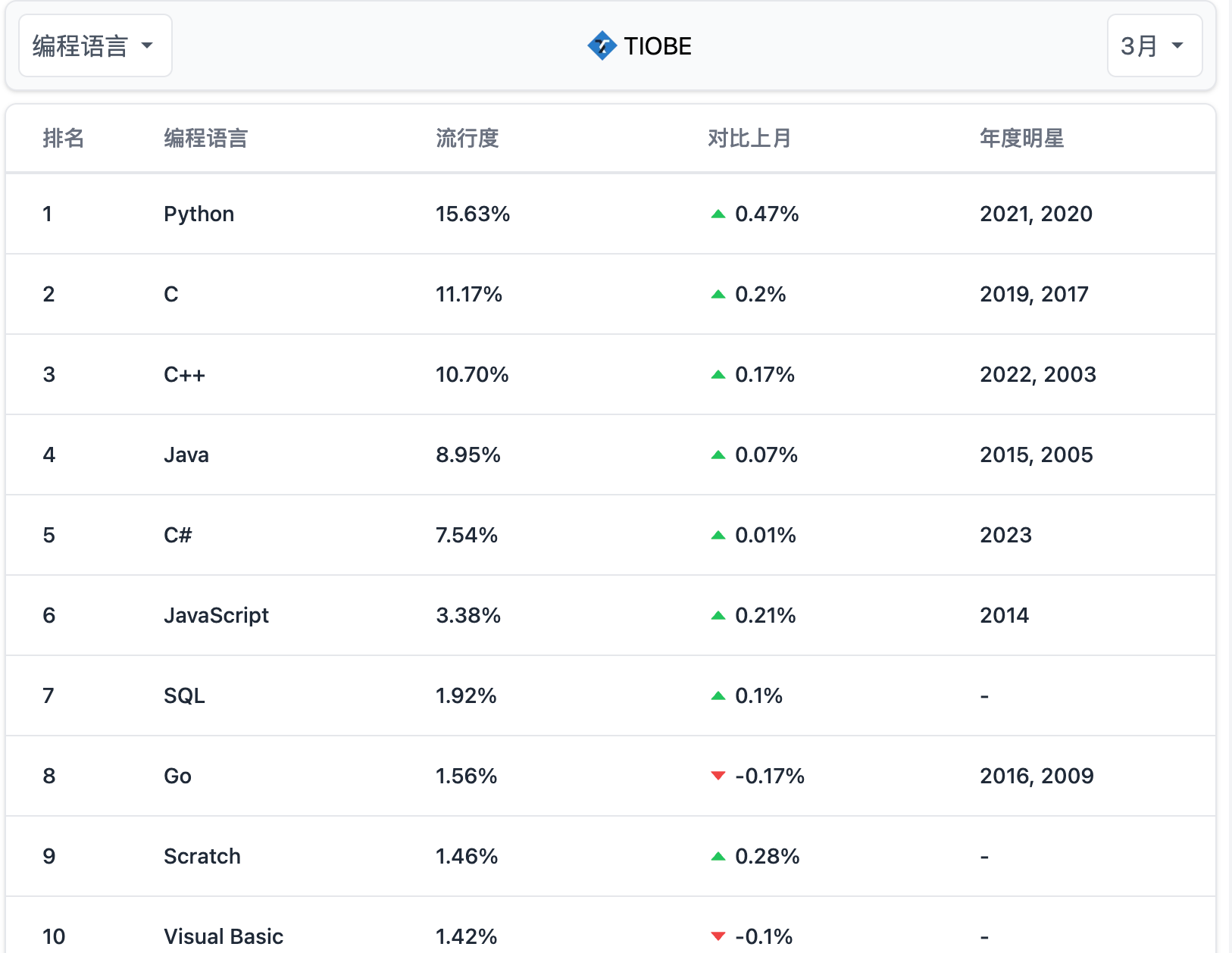
After completing these two tasks, let’s climb the third mountain: JavaScript — a language that’s consistently in the top 10 of programming language rankings. Proof:
JavaScript
A scripting language that brings interactivity to web pages — the magic that makes a webpage “come alive.” Think of it as the electrical and smart home system of a house.
- Video tutorial: https://www.bilibili.com/video/BV1Y84y1L7Nn
- Article tutorials:
Related resources:
- MDN Learning JavaScript: https://developer.mozilla.org/en-US/docs/Learn/JavaScript
- freeCodeCamp JavaScript Algorithms and Data Structures: https://www.freecodecamp.org/learn/javascript-algorithms-and-data-structures-v8/
JavaScript is the core technology of frontend, so be sure to practice by writing a lot of code. If you run into problems, ask AI promptly, or ask others. If you have time, consider reading these books to improve your JavaScript skills (not required):
- JavaScript Advanced Programming
- You Don’t Know JS
- JavaScript: The Good Parts
- Eloquent JavaScript
- JavaScript: The Definitive Guide
After learning the frontend trilogy, you can now add some events to your static projects and make the website “come alive.” If you try building websites with just raw technologies (HTML, CSS, JavaScript), you’ll find development is slow — especially for complex sites — and the code is hard to maintain. At this point, you’ll urgently need a framework to boost efficiency. So next, you can learn a framework and experience its magic.
Modern Frontend Development
Essential Environment: Package Manager
Before learning a framework, you need to learn about package managers such as npm, yarn, pnpm, etc. Learn the basics of using packages including installing, updating, and managing dependencies. During this process, you’ll find you need to switch Node versions and npm registry mirrors. Recommended:
- Node version management: https://juejin.cn/post/7000652162950758431
- npm registry switching: https://juejin.cn/post/7327937033321463820
Frontend Framework
Vue (recommended to learn)
Learn Vue 3 directly — Vue 2 is no longer maintained.
- Video tutorial: https://www.bilibili.com/video/BV1Za4y1r7KE
- Text tutorial: https://vuejs.org/
- Component library recommendation: Element Plus: https://element-plus.org/
I think Vue’s official website is the best tutorial and the best documentation, bar none. Vue is easier to get started with, so I recommend learning Vue.
Vue server-side framework (not required):
Nuxt: https://nuxt.com/
(If you can, read the English docs since they’re more accurate and up-to-date.)
Reference resources:
- Vue source code learning: https://juejin.cn/post/6925668019884523534
- Two big names in the Vue community:
- Evan You: https://evanyou.me/
- antfu: https://antfu.me/
React (currently the most used in large companies)
- Video tutorial: https://www.bilibili.com/video/BV1ZB4y1Z7o8
- Text tutorial: https://react.docschina.org/
- Component library recommendation: Ant Design: https://ant.design/
The new official docs were rewritten by Dan Abramov — they’re excellent. If you can, read the English version: https://react.dev/
React server-side framework:
Next.js: https://nextjs.org/
(Read the English docs if possible.)
Reference resources
- Ruan Yifeng’s React technology stack tutorial: https://www.ruanyifeng.com/blog/2016/09/react-technology-stack.html
- Geek Time React Hooks course: https://time.geekbang.org/column/intro/100079901
- Dan Abramov: https://overreacted.io/
No matter whether you learn Vue or React, after finishing the framework, you should build a single-page application using it — for example, create your own blog, then deploy it to the internet. Oh, and make sure to include it as a personal project on your resume. Refer to the following articles and video tutorials:
- https://www.bilibili.com/video/BV1rU4y1J785/
- https://www.bilibili.com/video/BV1uK411p7Bp
- https://zhuanlan.zhihu.com/p/554519860
Build Tools and CSS Preprocessors
Build Tools
webpack (recommended to learn)
- Video tutorial: https://www.bilibili.com/video/BV14T4y1z7sw
- Text tutorial: https://webpack.wuhaolin.cn/
- webpack official docs: https://webpack.js.org/
- Ruan Yifeng’s webpack demo code: https://github.com/ruanyf/webpack-demos
Vite
- Video tutorial: https://www.bilibili.com/video/BV1Kd4y147gg
- Text tutorial: https://vitejs.dev/guide/
Vite is the new generation bundling tool — faster and simpler. Currently, Vite’s underlying packaging relies on Rollup (a bundler), so knowing a bit about Rollup helps when using Vite. Learning goal: Use a build tool to package and deploy a project from scratch — for example, create your own scaffolding tool or publish your own npm package.
CSS Preprocessors
Less
- Video tutorial: https://www.bilibili.com/video/BV1i54y1U7zY
- Text tutorial: https://juejin.cn/post/6844903520441729037
- Official site: https://lesscss.org/
Sass
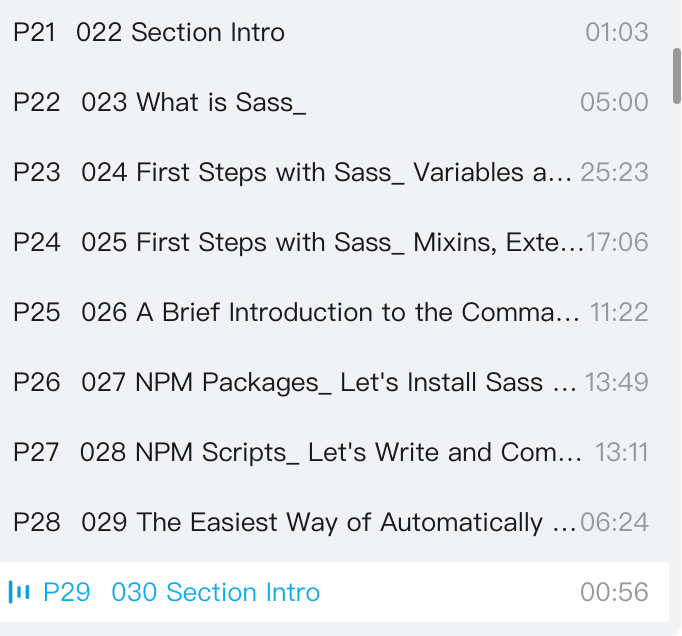
- Video tutorial: https://www.bilibili.com/video/BV1n94y1o7yS
Learn the following chapters from the course:
- Text tutorial: https://www.ruanyifeng.com/blog/2012/06/sass.html
- Official site: https://sass-lang.com/
Learning goal: Refactor a project using a preprocessor to improve CSS authoring efficiency.
Advanced Learning
By now, you’ll probably realize there are some topics you haven’t touched yet, like TypeScript, Node.js, ESLint, Prettier, etc. These are now essential skills for developing large-scale projects. Let’s dive in!
TypeScript
- Video tutorial: https://www.bilibili.com/video/BV1Xy4y1v7S2/
- Text tutorial: https://wangdoc.com/typescript/
Reference resources:
- Yayu’s TypeScript course: https://ts.yayujs.com/
- TypeScript introductory tutorial: https://ts.xcatliu.com/
Learning goal: Refactor your project using TypeScript.
Node.js
- Video tutorial: https://www.bilibili.com/video/BV1gM411W7ex
- Text tutorial: https://developer.mozilla.org/en-US/docs/Learn/Server-side/Express_Nodejs/Introduction
References:
- Ruan Yifeng’s Node tutorial (unfinished): https://github.com/wangdoc/nodejs-tutorial
- Node minimal tutorial: https://www.yuque.com/sunluyong/node
Learning goal: Write your own scaffolding tool, and use node-puppeteer to automate some tasks.
CSS Frameworks
- Tailwind CSS: https://tailwindcss.com/ (a utility-first CSS framework)
- Bootstrap: https://getbootstrap.com/ (a frontend framework designed to make web applications responsive and mobile-friendly)
Choosing between Tailwind CSS and Bootstrap depends on project requirements and development experience. Tailwind CSS suits projects that need high customization and unique styling, while Bootstrap is great for rapid development and standardization. Choose the framework that best matches your project and team. Learning goal: Use a CSS framework to simplify styling and boost page construction efficiency.
Mini Program Development
Here I’ll assume you mean WeChat Mini Programs. No matter which tech stack you use, you should go through the official WeChat Mini Program docs: https://developers.weixin.qq.com/miniprogram/dev/framework/
Vue tech stack: uni-app (which is very similar to Vue)
- Video tutorial: https://www.bilibili.com/video/BV1oy4y1j75s/
- Text tutorial: https://uniapp.dcloud.net.cn/resource.html
Reference: https://juejin.cn/post/6899642866693423111
React tech stack: Taro — this framework is used for large-scale mini program development.
- Video tutorial: https://www.bilibili.com/video/BV1vM4m1R7K3
- Text tutorial: https://taro-docs.jd.com/docs/
Learning goal: Build your own WeChat mini program and publish it.
Design Patterns
Understanding common design patterns helps you write better, more maintainable code. References:
- https://juejin.cn/post/7306459858127732786
- https://juejin.cn/post/7211026540129157180
- https://github.com/lxj/javascript.patterns
Frontend Engineering
Code Quality Tools (ESLint, Prettier, SonarLint)
ESLint
- Video tutorial: https://www.bilibili.com/video/BV183411r7YK
- Text tutorial: https://juejin.cn/post/6990929456382607374
- Official site: https://eslint.org/
Prettier
- Video tutorial: https://www.bilibili.com/video/BV183411r7YK
- Text tutorial: https://juejin.cn/post/6990929456382607374
- Official site: https://prettier.io/
SonarLint (not required, but I find it very helpful — it detects and highlights bugs, vulnerabilities, and code smells in real time, helping you improve code quality.) Learning goal: Add ESLint + Prettier to your project to maintain a consistent code style.
Frontend Performance Optimization
- Video tutorial: https://www.bilibili.com/video/BV1Xy4y1f7gv
- Text tutorial: https://godbasin.github.io/front-end-playground/front-end-basic/performance/front-end-performance-optimization.html
I haven’t practiced this myself yet; I found these resources online that I’ll likely use in the future. If you have good resources, please let me know! Reference: https://woai3c.github.io/introduction-to-front-end-engineering/
Hands-On Projects & Contributing to Open Source
Personal Projects
- Blog
- Others
Goal: Build one (or more) personal projects, deploy them online, and put them on your resume.
Community
- Submit PRs to open source repositories
- Publish articles on Juejin, SegmentFault, 51CTO, CSDN, etc.
If you contribute code to well-known open source projects, you can also list that on your resume.
Common Questions from Self-Learners (Beginners)
There are so many HTML/CSS properties — how can I remember them all? What if I forget earlier content?
Forgetting earlier content is completely normal. The key when you start learning is to write a lot of code so you develop a deeper impression. When you need a property, just look it up in the docs or ask an AI. Even senior frontend developers can’t work without a search engine (at least I can’t).
What if I lose motivation after a while?
Create things that give you a sense of accomplishment. Learn by recording and outputting. Learning itself gives little positive feedback, so you need to actively build a positive feedback loop. Then learning can be as enjoyable as playing a game.
What to do when stuck on a bug or a learning block?
- Ask Google
- Ask AI
- Join some communities — for example, the Programming Navigation Knowledge Planet — and ask experienced frontend developers.
Do I need to go deep into JavaScript?
Yes, but you can’t become an expert overnight. I think my JavaScript skills are just average, but in today’s framework-centric ecosystem, even with average JavaScript you can handle daily work. Let me share a big-name developer’s learning method: “Learn the basics of a technology, build a project, write a resume for a related job, then join the company and get paid to learn.” I agree with this, because on the job you’ll encounter many scenarios, which is the fastest way to grow technically, plus the pressure forces you to learn.
How to prepare for interviews?
In my understanding, an interview is about selling yourself — you need to package and present yourself so the interviewer thinks, “Wow, I have to hire this person.” So before the interview, memorize all the “eight-legged essays” (common questions), practice algorithms, prepare for interview questions, etc. Interviewing and working are two different things. References:
- Programmer Yupi’s step-by-step guide: https://bcdh.yuque.com/staff-wpxfif/resource/yvtiza4dmgumk3dt
- Ruan Yifeng’s “How to Write an Effective Technical Resume”: https://www.ruanyifeng.com/blog/2020/01/technical-resume.html
- The Essence of a Resume: https://github.com/Wscats/CV
How Can a Backend Developer Quickly Get Started with Frontend?
I asked my backend partner, Songbai, how to get into frontend quickly. His answer was:
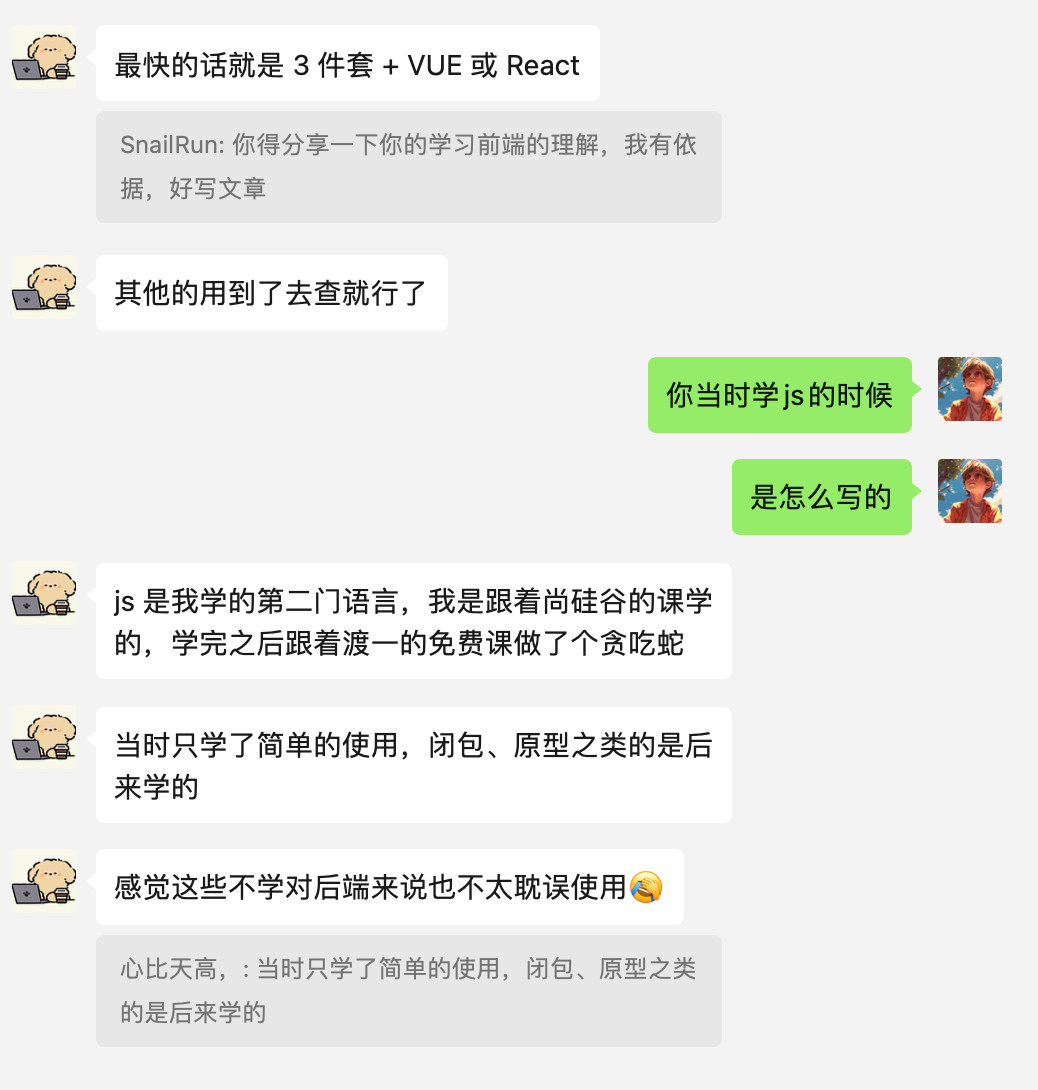 I totally agree. Backend developers already have a programming foundation, so learning another language is relatively easy. HTML + CSS are straightforward, and JavaScript is no problem. So all you need to learn is a framework. And Vue’s official documentation is so good — what more can I say!