
ESLint + Prettier Too Annoying? Let's Finally Fix It For Good
/ 3 min read /
Table of Contents 目录
As everyone knows, when setting up a frontend project in a team, you definitely need ESLint and Prettier to keep code style consistent. But if ESLint and Prettier aren’t configured properly, they can “fight” each other — and their configuration is pretty cumbersome. So what’s the solution? It’s actually simple: just use ready-made setups. Many big companies already provide out‑of‑the‑box solutions. Let’s check them out!
Here are five community‑provided options. Take a look at the table below — except for @antfu/eslint-config, all of them are open‑source from major companies.
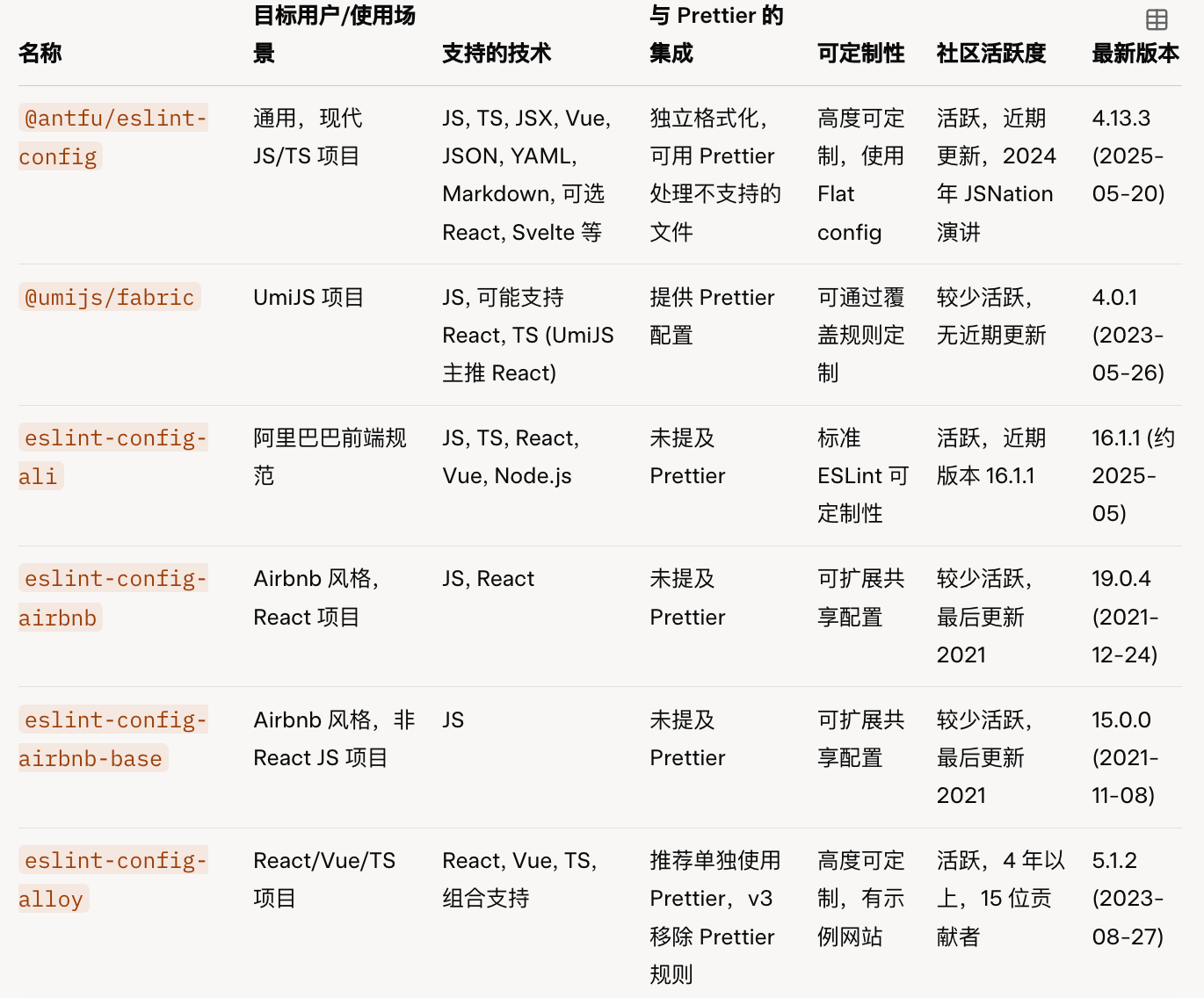
Now let’s dive into the pros and cons of each.
@antfu/eslint-config
This is an ESLint configuration created by Anthony Fu, a member of the Vue team. It’s zero‑configuration and works out of the box, supporting JS, TS, JSX, Vue, JSON, YAML, Markdown, and optionally React, Svelte, UnoCSS, Astro, Solid, and more. It also supports formatting CSS, HTML, XML, etc. via eslint-plugin-format. I think it’s excellent and highly recommend it.
It’s very easy to use — either via CLI:
pnpm dlx @antfu/eslint-config@latest
Or by installing it manually into your project:
pnpm i -D eslint @antfu/eslint-config
Then create an eslint.config.mjs file in the project root and configure it.
If you’re a fan of antfu, or if you’re not very familiar with ESLint and Prettier, this is a good choice.
@umijs/fabric
This is the coding standard from Ant Group’s Umi team. If you use the Umi framework, you should be familiar with it. However, its last update was two years ago.
It supports JS, and is suitable for React and TypeScript projects. It includes configurations for Prettier, ESLint, Stylelint, and Commitlint.
To use it, you need to install and configure it manually:
npm i @umijs/fabric --save-dev
Then, following the official docs, configure .eslintrc.js, .stylelintrc.js, and .prettierrc.js.
eslint-config-ali
This configuration follows Alibaba’s frontend engineering guidelines (F2E Guidelines). It supports various project types including JavaScript, TypeScript, React, Vue, and Node.js. Since it’s from a big company, compatibility and quality should be high. I’m actually using this one myself — recommended.
The recommended way is to use the CLI. Just run this in your project root:
npx f2elint
Then select your configuration, and it will automatically install dependencies and generate the corresponding scripts and config files.
eslint-config-airbnb and eslint-config-airbnb-base
- eslint-config-airbnb: Airbnb’s style guide, suitable for React projects.
- eslint-config-airbnb-base: Airbnb’s base JS config without React plugins, suitable for non‑React JS projects.
These are based on Airbnb’s JavaScript code style, one of the most popular industry standards. The GitHub repo has 147k stars, but the last update was in 2021.
To install and use it for a React project:
npx install-peerdeps --dev eslint-config-airbnb
For a non‑React project:
npx install-peerdeps --dev eslint-config-airbnb-base
Then configure .eslintrc.js.
eslint-config-alloy
This ESLint config is from Tencent’s AlloyTeam, supporting multiple tech stacks. It’s suitable for React, Vue, and TypeScript projects, especially for teams that need a high degree of customization. It was developed by Tencent’s AlloyTeam.
You can install it manually:
npm install --save-dev eslint @babel/core @babel/eslint-parser eslint-config-alloy
Final Thoughts
ESLint + Prettier remain the most mainstream tools for frontend code style, but there are rising challengers like Biome and Oxlint. Their integration is also quite simple. Choose a code formatting standard that fits your project, and then you can focus on coding and other things!