
How to Write Technical Blog Posts That Developers Love
/ 10 min read /
Table of Contents 目录
Translation of a great article: https://refactoringenglish.com/chapters/write-blog-posts-developers-read/
How to Write Technical Blog Posts That Developers Read
I recently spoke with a developer who tried blogging but gave up because nobody read his posts. I looked at his blog and immediately understood the problem.
The developer had unique insights, but he made a lot of mistakes in how he presented them that drove readers away. The sad part is, these problems are easy to fix. Once you learn to spot them, they seem obvious, but many bloggers repeat them for years.
I know because I was one of them.
I’ve been writing a software development blog for nine years. My most successful posts have reached over 300,000 readers, but I’ve also published plenty of duds, especially in my early years.
Over time, I’ve developed techniques for making posts successful, and I’ve learned which pitfalls guarantee obscurity.
Outline:
-
Why Listen to Me?
-
Method One: Get to the Point
-
Method Two: Widen Your Audience
-
Method Three: Plan Your Distribution
-
Method Four: Use More Pictures
-
Method Five: Design for Skimmers
Why Listen to Me?
To establish credibility, I need to say some boastful things, even though it feels uncomfortable:
-
I’ve run a software blog for nine years with 300,000–500,000 unique visitors per year.
-
My posts have hit the Hacker News front page over 30 times, ranking #1 multiple times.
- According to my own ranking system, my personal blog is ranked #48 on Hacker News.
-
I successfully launched a bootstrapped product through a popular blog post.
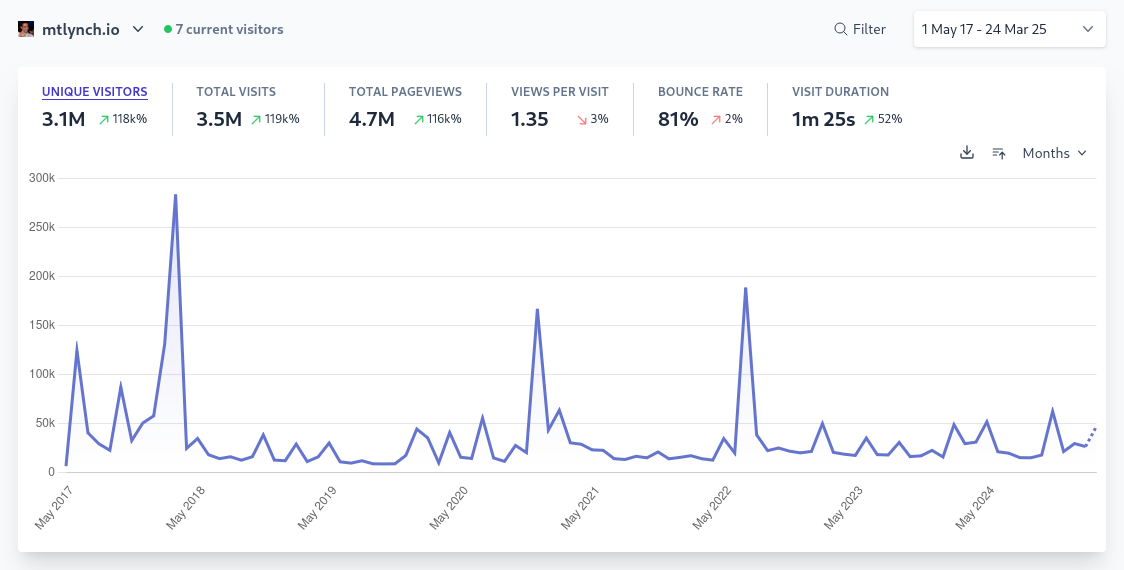 My blog analytics
My software blog gets 300,000–500,000 unique visitors per year.
I don’t claim to be the best software blogger in the world, but I have enough experience and success to share some useful lessons.
Get to the Point
The most common mistake among technical bloggers is rambling.
The author often has valuable insights, but wastes the first seven paragraphs talking about the history of functional programming or a trip to Bell Labs in 1973. By the time they get to the interesting part, the reader has already closed the tab.
Attention spans are short on the internet. If you don’t get to the point quickly, readers will move on to one of the billions of other articles out there.
So, how do you keep readers engaged?
When a reader opens your article, they quickly ask two questions:
- Is this post written for someone like me?
- What’s in it for me?
You need to answer both questions in the headline and the first three sentences. If you haven’t answered them by the second paragraph, you’re in trouble.
To make the reader feel the post is for them, mention topics they care about and use terminology they know. If you throw in jargon or unfamiliar concepts, the reader will assume the article isn’t for them and leave immediately.
The opening should also clearly state what the reader will gain from reading, such as:
- Tips they can apply at work or in their personal life.
- Clear explanations of concepts that affect their work or life.
- Insights that help them better understand a technology or industry.
- An interesting story they’ll enjoy and relate to.
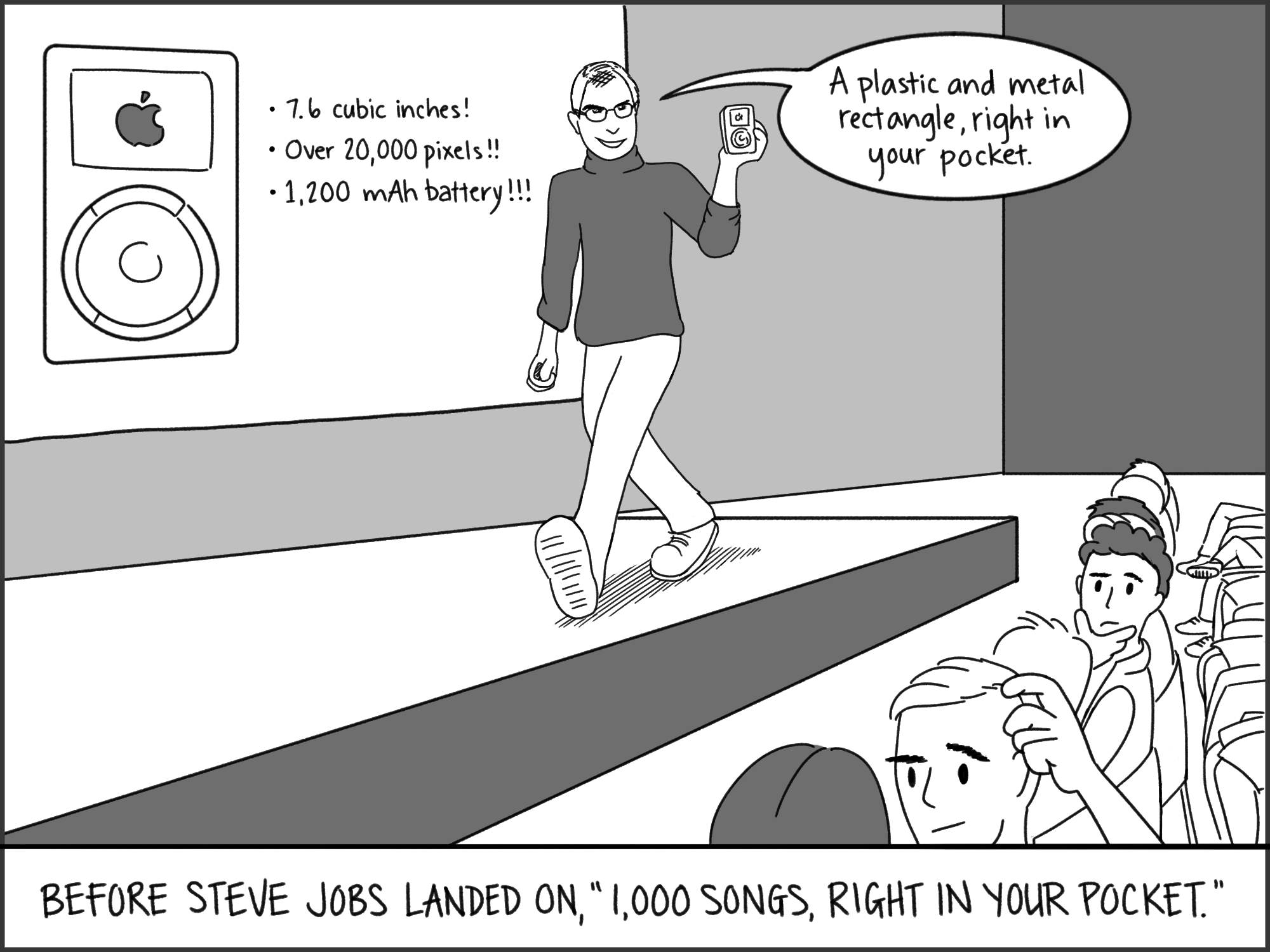 iPod announcement
Example: “if got, want: A Simple Way to Improve Go Tests”
I recently wrote an article about improving Go tests.
Here’s the headline and first paragraph:
if got, want: A Simple Way to Improve Go Tests
There’s a great Go testing pattern that too few people know about. I can teach it to you in 30 seconds.
This article immediately answered the two questions:
-
Who is this post for?
- Go developers.
-
What’s in it for me?
- Learn a new testing trick in 30 seconds.
Widen Your Audience
When you write a post, you probably have a target reader in mind. For example, if you write “Debugging Java Memory Leaks,” you might assume the reader is an intermediate to senior Java developer.
But most technical bloggers don’t ask: “Can this topic appeal to a broader audience?”
For instance, “intermediate to senior Java developer” is a subset of “Java developer,” which is a subset of “programmer,” which is a subset of “people who read blogs.”
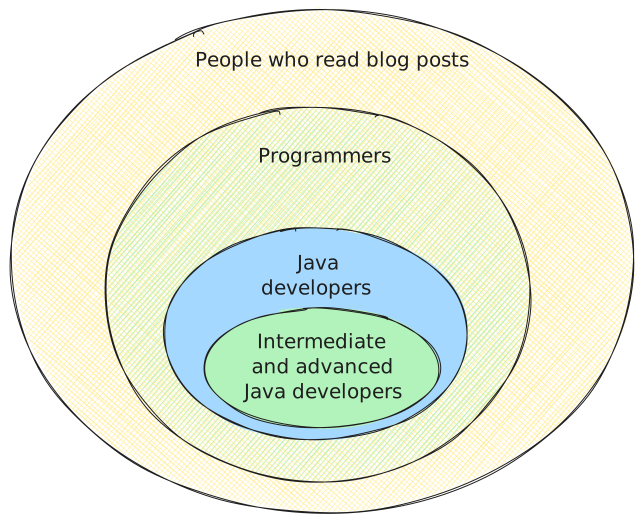 Developer categories
If you wrote a post for intermediate to senior Java developers, how much work would it take to make it appealing to all levels of Java developers?
Often, just a sentence or two of explanation at the beginning, or replacing jargon with more accessible terms.
Jeff: Sony has this futuristic sci-fi movie they want to make.
Nick: In space?
Jeff: It’s the final frontier, Nick.
Nick: But wouldn’t it explode in a pure oxygen environment?
Jeff: Probably. But it’s an easy fix. Just add a line: “Thank God we invented… that thing.”
—— Thank You for Smoking (2005)
All Java developers are roughly 10x the size of intermediate-to-senior Java developers. So a small adjustment can increase your audience by an order of magnitude.
Of course, not every article can be infinitely broad. No matter how much context you provide, your accountant readers won’t read about Java memory leaks. The point isn’t to please everyone, but to spot opportunities to widen your audience.
Example: “How I Stole Your Siacoin”
An early success of mine was “How I Stole Your Siacoin”, a story about how I stole someone’s cryptocurrency on Reddit (for legitimate reasons).
Initially, I thought only a few hundred people following the obscure cryptocurrency Siacoin would be interested. But while editing, I realized the story could be understood without knowing Siacoin. So I tweaked it to appeal to cryptocurrency enthusiasts who had never heard of Siacoin.
Then I realized the story could even be explained to people who knew nothing about cryptocurrency. I adjusted terms, using words like “wallet” and “password” that everyone understands, avoiding jargon like “blockchain” and “Merkle tree.”
That article became my first viral hit. It wasn’t just the top post of all time on /r/siacoin, it also hit #1 on the much larger /r/cryptocurrency. It even made the Hacker News front page, despite that community often being hostile to cryptocurrency topics.
Plan Your Distribution
Suppose you write the best Python tutorial ever. Your five-year-old nephew and 80-year-old dentist can both learn from it easily and enjoyably. Every reader ends up as a core contributor to Python.
Bad news: nobody will read your Python tutorial.
“Nonsense!” you shout. “Tens of thousands of developers learn Python every year. Why won’t my objectively awesome tutorial get traction?”
Well, think about what happens after you click publish. How do people find your article?
You might say: Google.
Sure, Google will index your tutorial, use its mysterious algorithm to recognize the high quality, and soon your tutorial will be the top result for python tutorial.
But that’s impossible because there are already hundreds of Python tutorials from websites Google prefers. Your article won’t even make the first page.
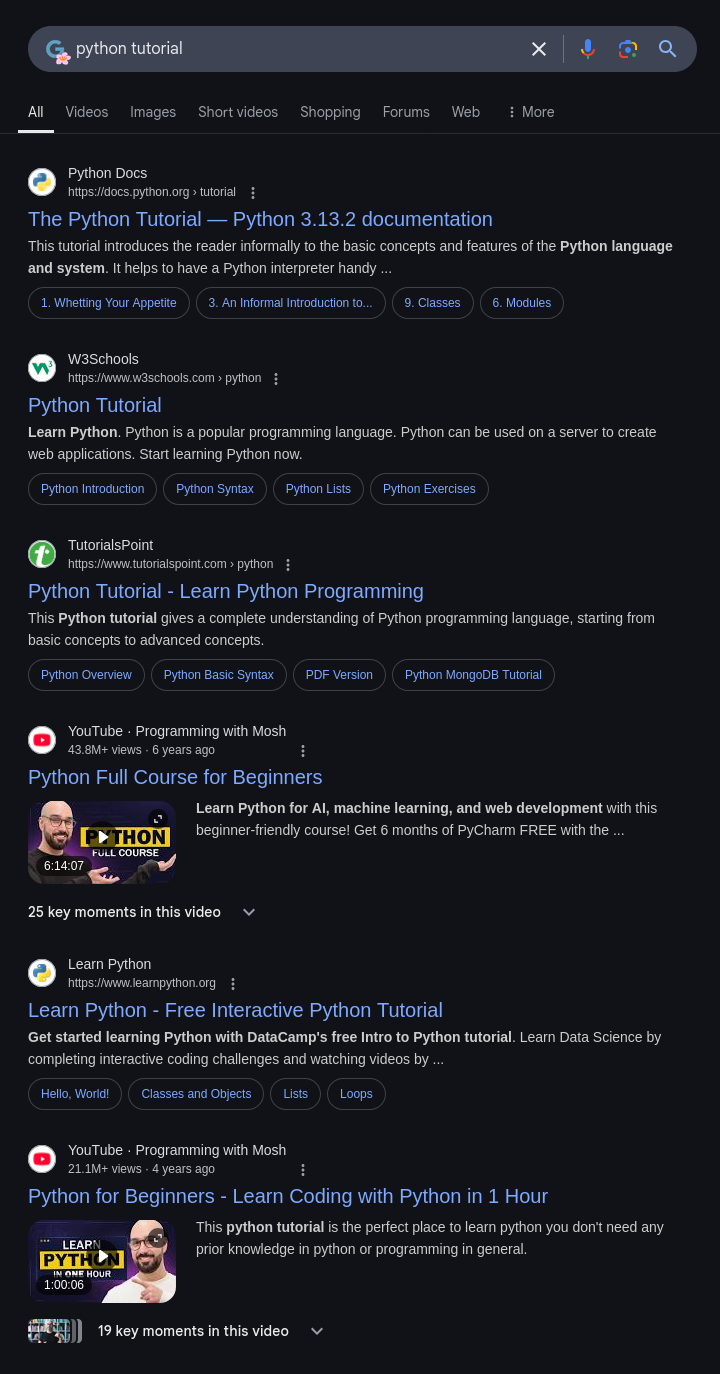 Google Python search results
Google Python search results
New blog articles have almost no chance of ranking high in Google for python tutorial.
Okay, so you post your Python tutorial to Reddit. The /r/python subreddit has over 1.3 million subscribers. Even if 5% read your post, that’s a huge audience:
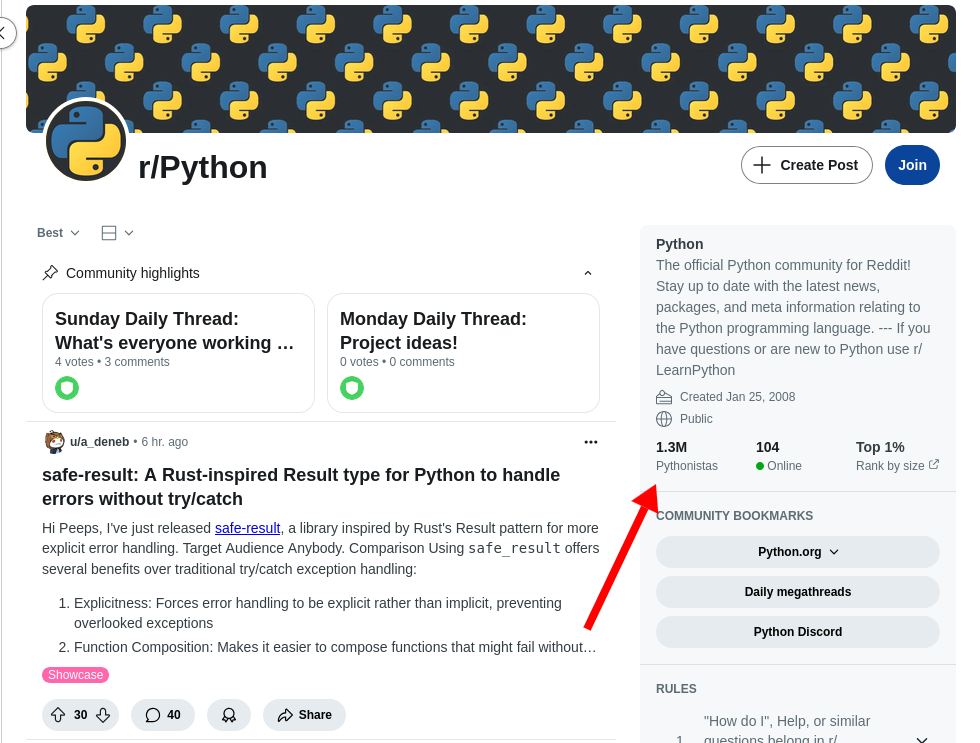 /r/python subscribers
The /r/python subreddit has over 1.3 million subscribers.
Oops! /r/python only accepts text posts, not external links, so you can’t post your tutorial there.
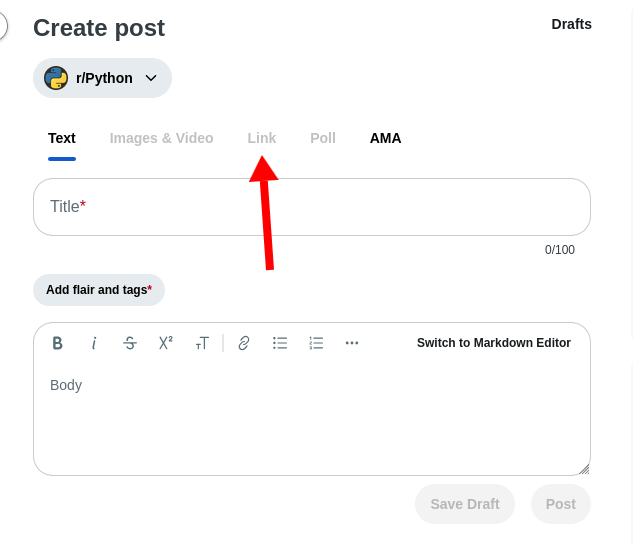 /r/python text-only posts
/r/python has disabled the option to submit external links.
Okay, so you post it on Hacker News. They accept any content and let the community decide what’s interesting. Surely they’ll recognize your article’s quality!
Nope, it will fail there too. Hacker News doesn’t like tutorials, especially for mainstream technologies like Python.
You could try sharing on Twitter, Bluesky, or Mastodon, but it’s hard to get traction unless you already have a large following.
So what’s the answer? How do you get people to read your awesome Python tutorial?
The answer is: don’t write a Python tutorial for beginners.
You Need a Realistic Distribution Path
If you want people to read your blog, choose topics with a clear distribution path. Before you start writing, think about how readers will discover your post.
Questions to ask when choosing a topic:
-
Is it realistic for people to find your post through Google search?
-
Are there already 500 posts on the same topic from more reputable sites?
-
What keywords would your target readers search for? Try those keywords and see if well-known sites already have relevant results.
-
-
If you plan to post on aggregators like Hacker News or Lobsters, have similar articles succeeded there before?
-
If you plan to post on a subreddit or niche forum, is there a chance of success?
-
Does the forum accept blog post links?
- The larger the community, the stricter the rules on external links and self-promotion.
-
Have similar blog posts succeeded there before?
-
Is the community still active?
-
The best strategy is to give your article multiple chances at success. If you rely entirely on Google to push your post to the top, it might take months or years to know if it worked. If you rely entirely on Hacker News or Reddit to judge your article’s value, you’ll often get disappointed.
Example: “Using Zig to Unit Test a C Application”
In 2023, I wrote an article about using a new language called Zig to test legacy C code.
Before writing, I knew several places to share this article. Fortunately, they all worked:
-
Hacker News is very friendly to Zig content, and my post reached #7 on the front page.
-
Lobsters is very friendly to Zig content, and my post became the top link of the day.
-
Google ranked my post #1 for
zig unit testing c.- And even for
zig unit testing, because there are few articles on the topic.
- And even for
-
The /r/Zig subreddit accepts blog post links, even self-promotion, and my post hit #1 on the subreddit.
-
Ziggit is a niche forum that welcomes Zig-related articles, and my post got 1,000 views.
Use More Pictures
The single change that can most improve a blog post is adding pictures.
If your post is a wall of text, think about whether you can add photos, screenshots, charts, or diagrams to increase visual appeal.
-
If you’re discussing a program with a GUI, show a screenshot.
-
If you’re discussing improvements in metrics like app performance or active users, show a chart.
-
If you’re talking about a server overload, show a screenshot of a dashboard or email alert.
-
If you’re explaining a complex concept, draw a diagram.
I hire cartoonists for most of my posts (including this one), usually paying $50–$100 per image. For simple diagrams (like the nested circles above), I use the free Excalidraw, which is open source.
You can also use free stock photos or AI-generated images. They’re better than nothing, but worse than anything else—including a terrible MS Paint doodle.
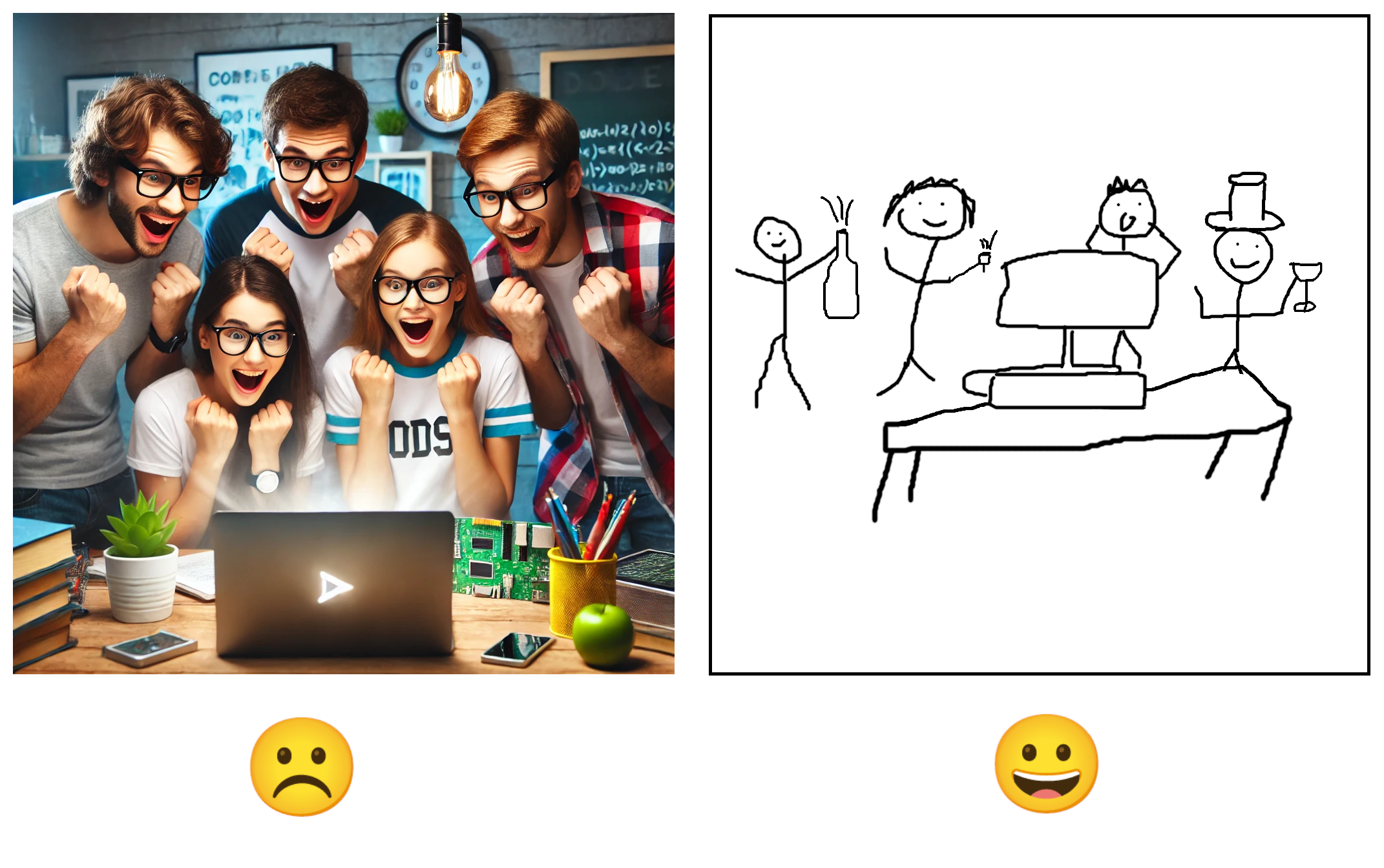 AI vs MS Paint
Even a terrible MS Paint doodle is more interesting than AI-generated images.
Design for Skimmers
Many readers will skim your post first before deciding whether to read it in full. You need to grab their attention during that brief skim.
If a reader only looks at the title and images, would they be interested?
The worst thing for skimmers is a wall of text: long paragraphs with no images or headings to break them up.
Tool: Preview Your Post in Skim Mode
Here’s a JavaScript bookmarklet that lets you see only the headings and images of your article.
Drag the link to your browser’s bookmarks bar, click it, and you’ll see how your post looks to a skimmer.
Example: Boring Structure vs. Interesting Structure
In 2019, I wrote “End-to-End Testing Web Apps: The Painless Way,” before I had figured out structure.
Would skimming this make you want to read it in full?
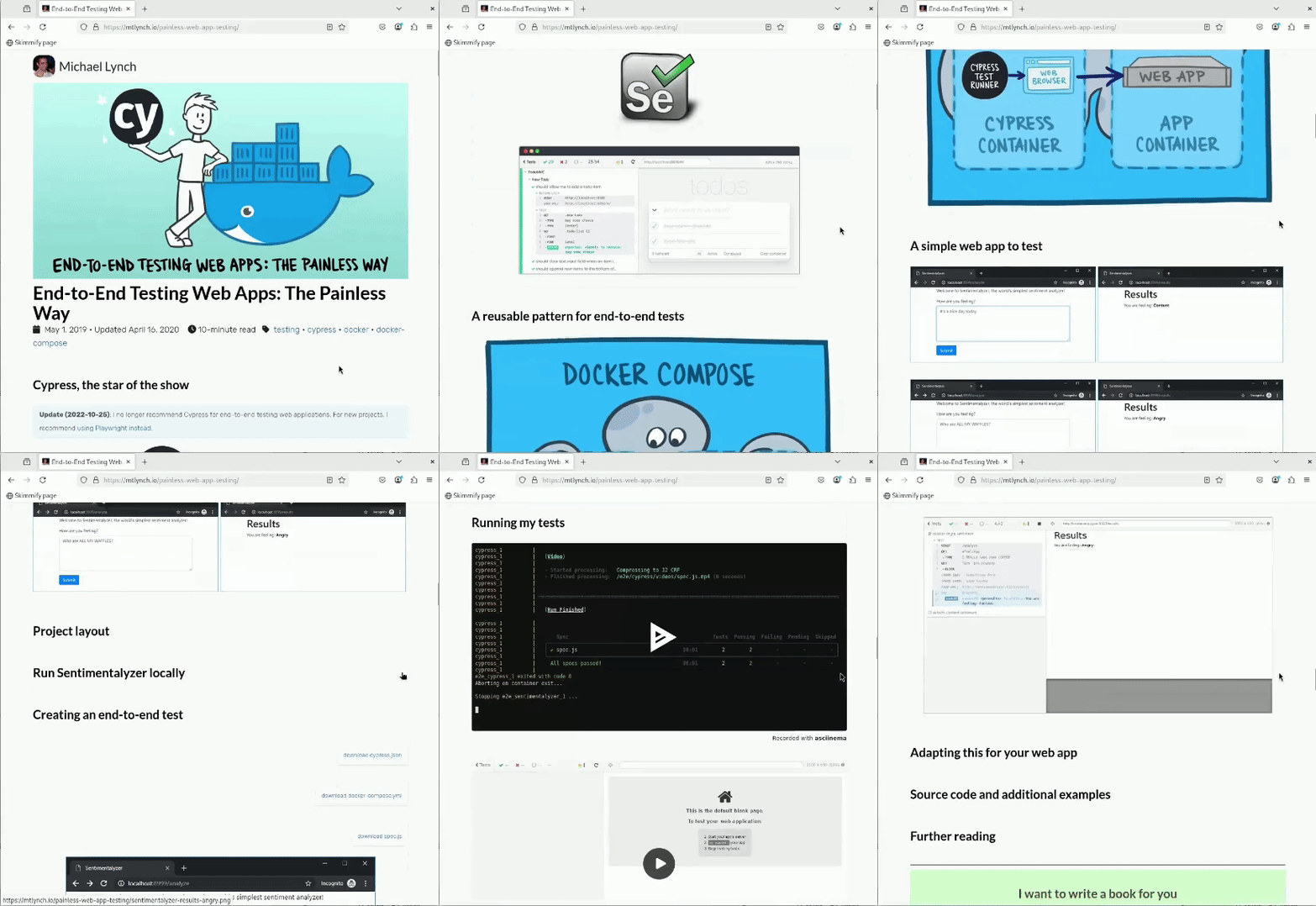
Probably not. The titles don’t reveal much, and the visuals are confusing.
Now look at my recent post “I Regret Spending $46,000 to Redesign My Website.”
.gif)
When skimming this, you can still see the skeleton of a good story, and interesting visual elements draw the reader in.
One of those posts got virtually no traffic. The other got 150,000 unique visitors in its first week and became one of my most popular posts. Can you guess which is which?
That’s it! The cover image is provided by svgshow.cn. If you want to know more about me, visit: luckysnail.cn