
Reading Part of the vercel-ai Source Code: How to Achieve High Concurrency for Streaming Requests
/ 6 min read /
Table of Contents 目录
Background
While developing an AI tool, I used fetch to call the AI API myself, and ran into problems under concurrent scenarios. After asking around, I found the open-source community project: https://github.com/vercel/ai , which directly solved my problem. It worked exactly as expected, so I decided to dig into how it’s implemented.
Purpose
Find the implementation of streamText in the source code, and then figure out how it supports concurrent requests.
streamText Feature Analysis
Official API docs: https://sdk.vercel.ai/docs/reference/ai-sdk-core/stream-text
Input it accepts:
model: the language model to usesystem: system message that will be part of the prompttools: set of tools available for the model to call. Model must support tool calling.prompt: simple text prompt.promptandmessagescannot be used together.messages: list of messages.promptandmessagescannot be used together.- and many more… Output it returns:
textStream: a text stream that only returns deltas of generated text. You can use it as anAsyncIterableorReadableStream. On error, the stream throws.- and many more… There are many other parameters beyond those listed, but our goal is to understand the request-sending logic, so I won’t enumerate them all!
Reading the Source
Here my goal is to find how requests are sent, data is processed, and content is returned.
- Install the source code
git clone git@github.com:vercel/ai.gitAfter installation, I opened it with Cursor.
- Find the source file
I know that streamText is exported from ai, so it must be under the ai directory. I found it here: vercel/ai/packages/ai/core/generate-text/stream-text.ts. But it turned out to be 1600 lines! I’d rather go play games (just kidding).
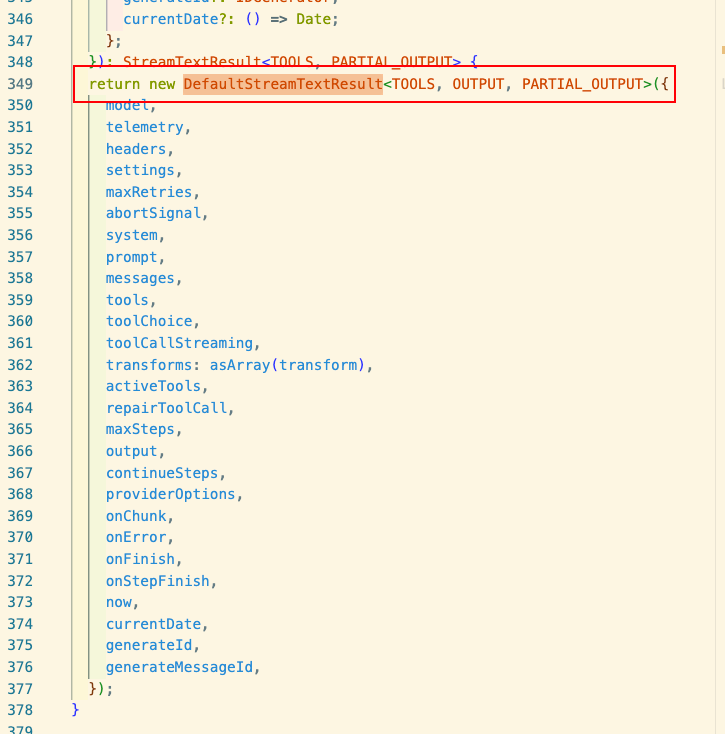 Here you can see that it returns an instance of
 DefaultStreamTextResult. The code logic is too complex, so I used AI to help locate the relevant parts:
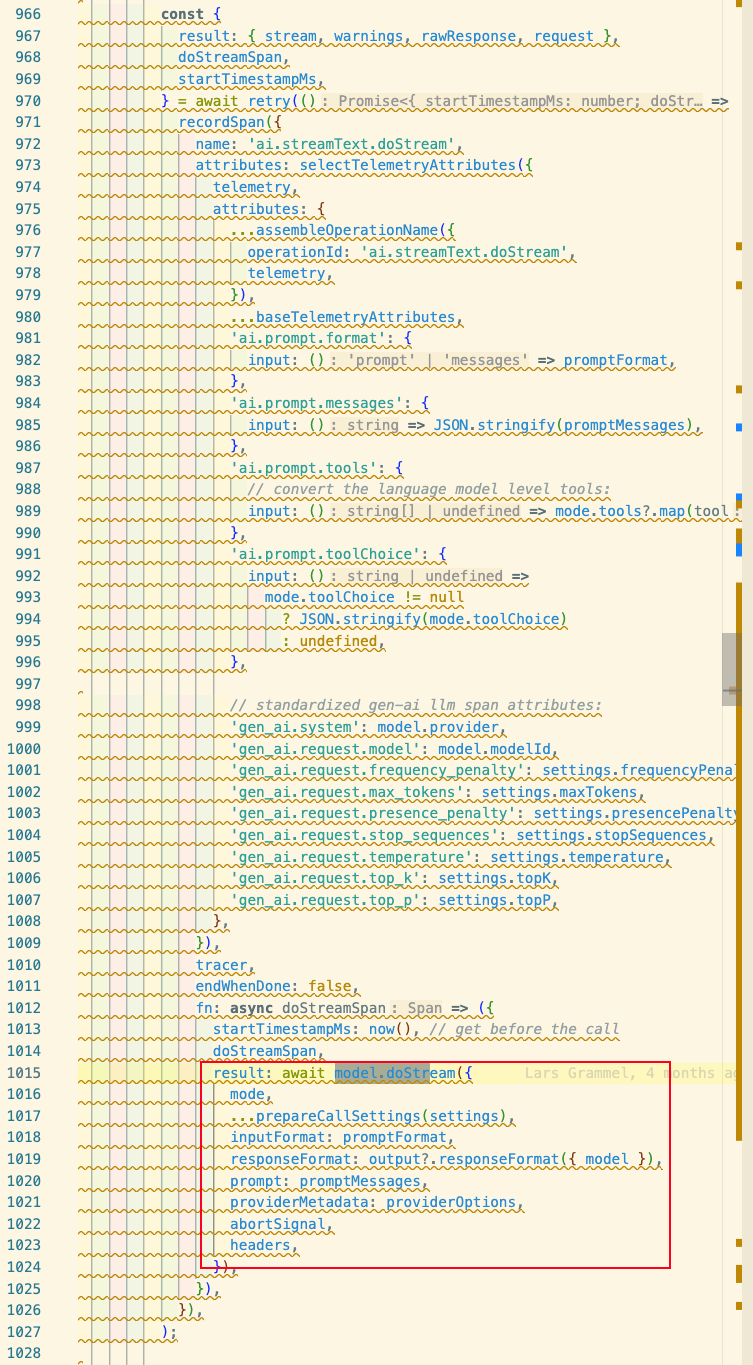 Here you can see that it calls the model’s own
 doStream method to get the result. streamText is responsible for preparing request data, then calling model.doStream() and processing the returned data.
So we go look at how the model writes its own doStream method. I’m looking at OpenAI here, so we go to: packages/openai/src/openai-chat-language-model.ts. There we can see:
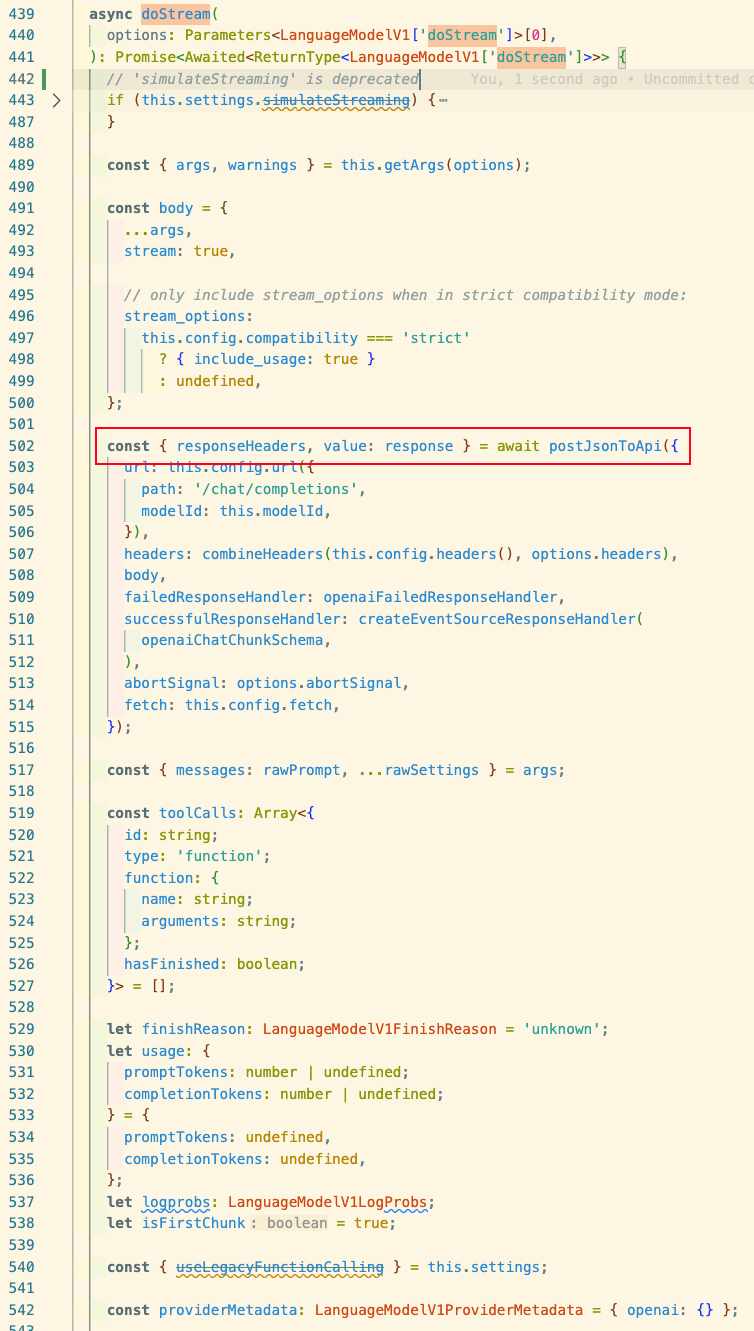 It calls
 postJsonToApi from @ai-sdk/provider-utils. We continue to packages/provider-utils/src/post-to-api.ts and can see that postJsonToApi returns PostToApi, so we look at this method:
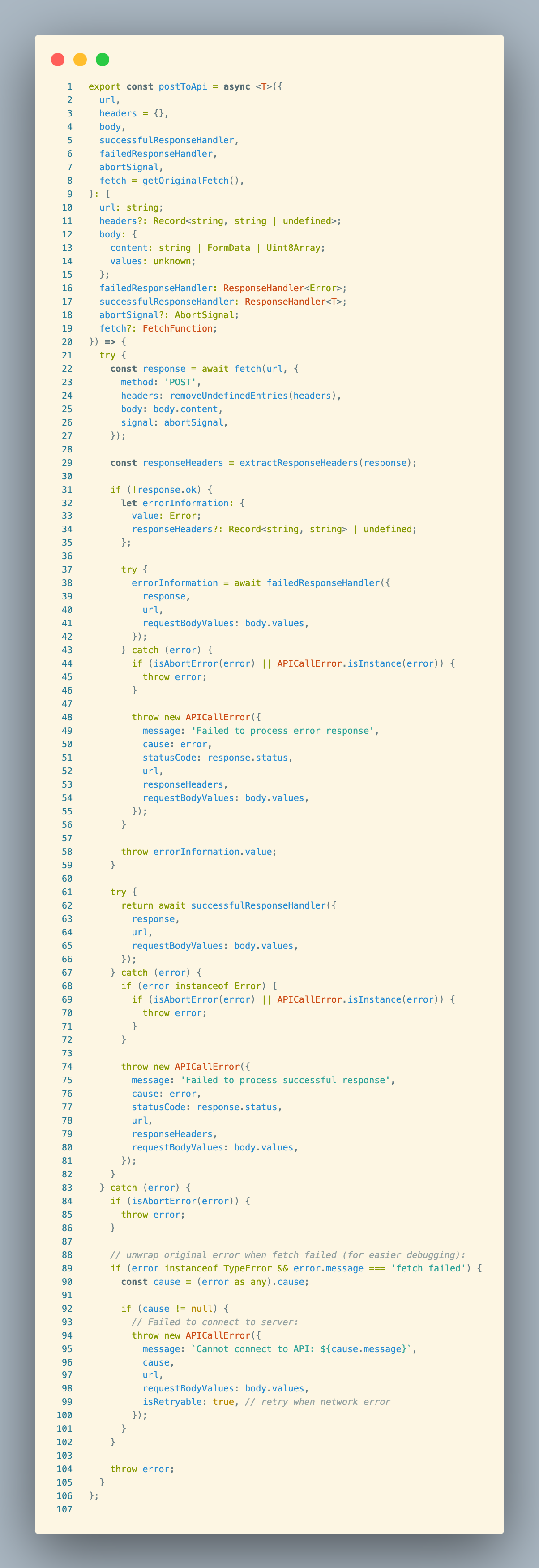
This is the method we’re looking for. Let’s look at it in detail: It accepts:
url: URL of the target APIheaders: request headersbody: request body (containscontentandvalues)successfulResponseHandler: handler for successful responsesfailedResponseHandler: handler for failed responsesabortSignal: abort signalfetch = getOriginalFetch(): fetch implementation (defaults to global fetch) It returns: passes theresponsetosuccessfulResponseHandler. That is, it returns the result of executing thesuccessfulResponseHandlerfunction. Then:
- Sends the HTTP request
- Extracts and processes response headers
- Error handling – multiple steps to parse and throw errors
- Success handling – also uses try-catch to ensure any errors during success processing are thrown
- Network error handling – handles fetch failures and sets retryable
Code analysis:
- Async non-blocking: uses async/await for async operations, doesn’t block the event loop
- Event-driven: uses promises, when the network request completes, the response is handled via event callbacks
- Error handling chain: fine-grained error handling ensures accurate error information on failure, with retry support
successfulResponseHandler
In the OpenAI code, we saw createEventSourceResponseHandler passed as successfulResponseHandler. createEventSourceResponseHandler is located at packages/provider-utils/src/response-handler.ts. The code:
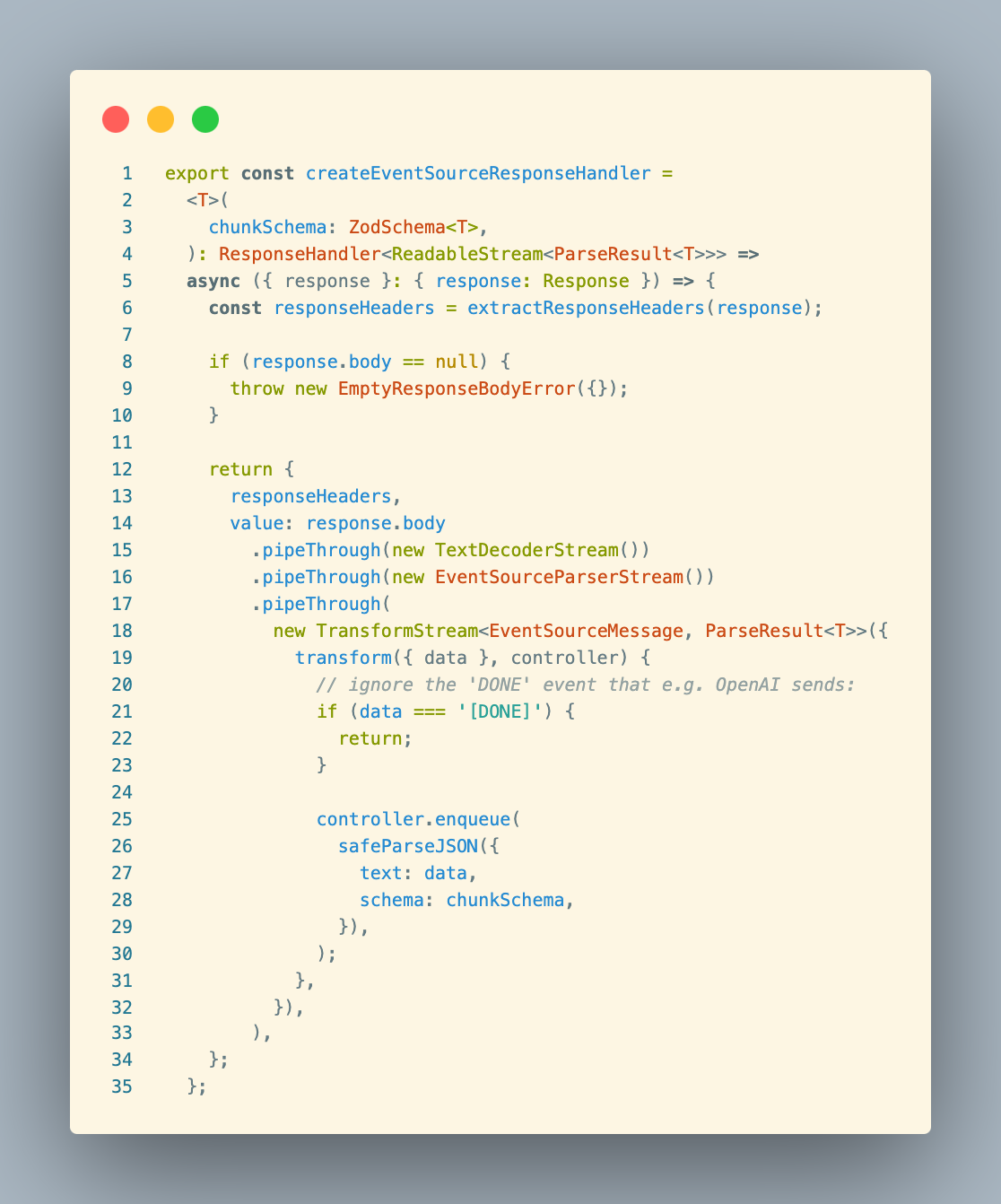
createEventSourceResponseHandler is a factory function that creates a handler for processing Server-Sent Events (SSE) format responses. It uses ReadableStream.PipeThrough() method for data processing:
TextDecoderStream: converts binary to textEventSourceParseStream: parses SSE formatTransformStream: processes each event data- Uses enqueue() to push a given chunk of data into the associated stream This streaming approach allows the function to efficiently process large amounts of data without waiting for all data to be received.
Advantages:
- Non-blocking processing: uses streaming, doesn’t block the event loop
- Incremental processing: can immediately process each arriving data chunk without waiting for the full response
- Memory efficient: avoids loading the entire response into memory
- Type safe: ensures each data chunk matches the expected format via Zod schema
- Error isolation: a single data chunk parsing error doesn’t affect the entire flow
stream-text Flowchart
flowchart TD A[User calls streamText] --> B[Initialize parameters and settings] B --> C[Create stream processing pipeline] C --> D[Execute streamStep function] D --> E[Call model.doStream to request API] E --> F[Process streaming response] F --> G{Need subsequent steps?} G -->|Yes| H[Update message history] H --> D G -->|No| I[Close stream and return result]Initialization:
flowchart TD A[User calls streamText] --> B[Validate parameters] B --> C[Initialize promise objects] C --> D[Create pipeable stream] D --> E[Set up stream transformers] E --> F[Prepare telemetry and retry settings] F --> G[Normalize prompt]API Request handling:
flowchart TD    A[streamStep function] --> B[Prepare prompt]    B --> C[Prepare tool selection]    C --> D[Apply model settings]    D --> E[Wrap request with retry function]    E --> F["model.doStream initiates API request"]
    subgraph "Actual API call"    F --> G[doStream implementation in provider package]    G --> H[Call postToApi/postJsonToApi]    H --> I[Send actual HTTP request]    end
    I --> J[Return streaming response]
Stream processing pipeline:
flowchart TD    A[Get API response stream] --> B[Apply tool transformation]    B --> C[Create event handler]
    subgraph "Transform streams"    C --> D[Process text deltas]    C --> E[Process reasoning content]    C --> F[Process tool calls]    C --> G[Process step completion]    end
    H[Merge all transform streams] --> I[Output to final result]
Multi-step processing and tool calling:
flowchart TD    A[Receive step result] --> B{Check finish reason}    B -->|Tool call| C[Execute tool]    B -->|Length limit| D[Continue generation]    B -->|Complete| E[End stream]
    C --> F[Process tool result]    F --> G[Prepare next step input]    G --> H[Execute next step]
    D --> I[Continue current message]    I --> J[Execute next step]
Data output processing:
flowchart TD    A[Stream processing complete] --> B[Parse final result]    B --> C[Separate different data types]
    subgraph "Output stream transformation"    C --> D[textStream]    C --> E[fullStream]    C --> F[dataStream]    end
    G[User selects output format] --> H[Return corresponding format data]
Data flow process:
User input → formatting into a prompt the model understands
API request → uses postToApi to issue HTTP request
Streaming return → uses TransformStream to process returned data chunks
Transform processing → processes each data chunk according to type (text, tool call, reasoning, etc.)
Result integration → integrates all processed data into the final result
Multi-step processing mechanism: The code supports multi-step processing, via:
- Handling tool call results and starting new API requests as needed
- Continuing generation when the model output is truncated (finishReason is “length”)
- Maintaining message history, using the output of previous steps as part of the input for subsequent steps This design enables the SDK to support complex conversation and tool usage scenarios, achieving a more intelligent interactive experience.