
React V19 Official Blog (Translation)
/ 19 min read /
Table of Contents 目录
React 19 is Here!
December 5, 2024 by The React Team
Note React 19 is now stable!
Since the React 19 RC was published in April, here’s what’s new:
- Warming up Suspense Trees: see Improvements to Suspense.
- React DOM Static APIs: see New React DOM Static APIs.
This post’s date has been updated to reflect the stable release date.
React v19 is now available on npm!
In our React 19 Upgrade Guide, we shared step-by-step instructions for upgrading your app to React 19. In this post, we’ll give an overview of the new features in React 19, and how you can adopt them.
For a list of breaking changes, see the Upgrade Guide.
What’s new in React 19
Actions
A common use case in React apps is to perform a data mutation and then update state in response. For example, when a user submits a form to change their name, you’ll make an API request, then handle the response. In the past, you’d need to manually handle pending states, errors, optimistic updates, and sequential requests.
For example, you could use useState to handle pending and error states:
// Before Actionsfunction UpdateName({}) {  const [name, setName] = useState("");  const [error, setError] = useState(null);  const [isPending, setIsPending] = useState(false);
  const handleSubmit = async () => {    setIsPending(true);    const error = await updateName(name);    setIsPending(false);    if (error) {      setError(error);      return;    }    redirect("/path");  };
  return (    <div>      <input value={name} onChange={(event) => setName(event.target.value)} />      <button onClick={handleSubmit} disabled={isPending}>        Update      </button>      {error && <p>{error}</p>}    </div>  );}
In React 19, we’re adding support for using async functions in transitions to automatically handle pending states, errors, forms, and optimistic updates.
For example, you can use useTransition to handle the pending state for you:
// Using pending state from Actionsfunction UpdateName({}) {  const [name, setName] = useState("");  const [error, setError] = useState(null);  const [isPending, startTransition] = useTransition();
  const handleSubmit = () => {    startTransition(async () => {      const error = await updateName(name);      if (error) {        setError(error);        return;      }      redirect("/path");    })  };
  return (    <div>      <input value={name} onChange={(event) => setName(event.target.value)} />      <button onClick={handleSubmit} disabled={isPending}>        Update      </button>      {error && <p>{error}</p>}    </div>  );}
The async transition will immediately set the isPending state to true, make the async request, and switch isPending to false once any transitions are complete. This allows you to keep the current UI responsive and interactive while the data is changing.
Note By convention, functions that use async transitions are called “Actions”.
Actions automatically manage submitting data for you:
- Pending state: Actions provide a pending state that starts at the beginning of a request and automatically resets when the final state update is committed.
- Optimistic updates: Actions support the new
useOptimistichook so you can show users instant feedback while the request is submitting.- Error handling: Actions provide error handling so you can display Error Boundaries when a request fails, and automatically revert optimistic updates to their original value.
- Forms:
<form>elements now support passing functions to theactionandformActionprops. Passing functions to theactionprop use Actions by default and reset the form automatically after submission.
Building on Actions, React 19 introduces useOptimistic to manage optimistic updates, and a new hook React.useActionState to handle the common cases for Actions. In react-dom we’re adding <form> Actions to automatically manage forms and useFormStatus to support the common cases for Actions in forms.
In React 19, the above example can be simplified to:
// Using <form> Actions and useActionStatefunction ChangeName({ name, setName }) {  const [error, submitAction, isPending] = useActionState(    async (previousState, formData) => {      const error = await updateName(formData.get("name"));      if (error) {        return error;      }      redirect("/path");      return null;    },    null,  );
  return (    <form action={submitAction}>      <input type="text" name="name" />      <button type="submit" disabled={isPending}>Update</button>      {error && <p>{error}</p>}    </form>  );}
In the next section, we’ll break down each of the new Action features in React 19.
New hook: useActionState
To make the common cases for Actions easier, we’ve added a new hook called useActionState:
const [error, submitAction, isPending] = useActionState( async (previousState, newName) => { const error = await updateName(newName); if (error) { // You can return any result of the action. // Here, we only return the error. return error; } // handle success return null; }, null,);useActionState accepts a function (the “Action”), and returns a wrapped Action to call. This works because Actions are composable. When the wrapped Action is called, useActionState will return the last result of the Action as data, and the pending state of the Action as pending.
Note In the Canary releases,
React.useActionStatewas previously calledReactDOM.useFormState, but we’ve renamed it and deprecateduseFormState. See #28491 for more info.
For more information, see the docs for useActionState.
React DOM: <form> Actions
Actions are also integrated with React 19’s new <form> features for react-dom. We’ve added support for passing functions as the action and formAction props of <form>, <input>, and <button> elements to automatically submit forms with Actions:
<form action={actionFunction}>When a <form> Action succeeds, React will automatically reset the form for uncontrolled components. If you need to reset the <form> manually, you can call the new requestFormReset React DOM API.
For more information, see the react-dom docs for <form>, <input>, and <button>.
React DOM: New hook: useFormStatus
In design systems, it’s common to write design components that need access to information about the <form> they’re in, without drilling props down to the component. This can be done via Context, but to make this common case easier, we’ve added a new hook useFormStatus:
import {useFormStatus} from 'react-dom';
function DesignButton() {  const {pending} = useFormStatus();  return <button type="submit" disabled={pending} />}
useFormStatus reads the status of the parent <form> as if the form was a Context provider.
For more information, see the react-dom docs for useFormStatus.
New hook: useOptimistic
Another common UI pattern when performing a data mutation is to optimistically show the final state while the async request is in progress. In React 19, we’re adding a new hook called useOptimistic to make this easier:
function ChangeName({currentName, onUpdateName}) {  const [optimisticName, setOptimisticName] = useOptimistic(currentName);
  const submitAction = async formData => {    const newName = formData.get("name");    setOptimisticName(newName);    const updatedName = await updateName(newName);    onUpdateName(updatedName);  };
  return (    <form action={submitAction}>      <p>Your name is: {optimisticName}</p>      <p>        <label>Change Name:</label>        <input          type="text"          name="name"          disabled={currentName !== optimisticName}        />      </p>    </form>  );}
The useOptimistic hook will immediately render the optimisticName while the updateName request is in progress. When the update finishes or errors, React will automatically switch back to the currentName value.
For more information, see the docs for useOptimistic.
New API: use
In React 19, we’re introducing a new API to read resources in render: use.
For example, you can read a promise with use, and React will Suspend until the promise resolves:
import {use} from 'react';
function Comments({commentsPromise}) {  // `use` will suspend until the promise resolves.  const comments = use(commentsPromise);  return comments.map(comment => <p key={comment.id}>{comment}</p>);}
function Page({commentsPromise}) {  // When `use` suspends in Comments,  // this Suspense boundary will be shown.  return (    <Suspense fallback={<div>Loading...</div>}>      <Comments commentsPromise={commentsPromise} />    </Suspense>  )}
Note
usedoes not support promises created in render.If you try to pass a promise created in render to
use, React will warn:A component was suspended by an uncached promise. Creating promises inside a Client Component or hook is not yet supported, except via a Suspense-compatible library or framework.To fix, you need to pass a promise from a Suspense-powered library or framework that supports caching of promises. In the future we plan to release features to make it easier to cache promises in render.
You can also read context with use, allowing you to read Context conditionally such as after early returns:
import {use} from 'react';import ThemeContext from './ThemeContext'
function Heading({children}) {  if (children == null) {    return null;  }
  // This would not work with useContext  // because of the early return.  const theme = use(ThemeContext);  return (    <h1 style={{color: theme.color}}>      {children}    </h1>  );}
The use API can only be called in render, similar to hooks. Unlike hooks, use can be called conditionally. In the future we plan to support more ways to consume resources in render with use.
For more information, see the docs for use.
New React DOM Static APIs
We’ve added two new APIs to react-dom/static for static site generation:
These new APIs improve on renderToString by waiting for data to load for generating static HTML. They are designed to work with streaming environments like Node.js Streams and Web Streams. For example, in a Web Stream environment, you can prerender a React tree to static HTML using prerender:
import { prerender } from 'react-dom/static';
async function handler(request) {  const {prelude} = await prerender(<App />, {    bootstrapScripts: ['/main.js']  });  return new Response(prelude, {    headers: { 'content-type': 'text/html' },  });}
The prerender APIs will wait for all data to load before returning the static HTML stream. The stream can be converted to a string, or sent with a streaming response. They do not support streaming content as it loads, which is supported by the existing React DOM server rendering APIs.
For more information, see React DOM Static APIs.
React Server Components
Server Components
Server Components are a new option that allows rendering components ahead of time, before bundling, in an environment separate from your client app or SSR server. This separate environment is the “server” in React Server Components. Server Components can run once at build time on your CI server, or they can be run for each request using a web server.
React 19 includes all of the React Server Components features included from the Canary channel. This means libraries that ship with Server Components can now target React 19 as a peer dependency with the react-server export condition for use in frameworks that support the Full-stack React Architecture.
Note
How to build support for Server Components? While React Server Components in React 19 are stable and will not break between minor versions, the underlying APIs used to implement a React Server Components bundler or framework do not follow semver and may break between minors in React 19.x.
To support React Server Components as a bundler or framework, we recommend pinning to a specific React version, or using the Canary release. We will continue working with bundlers and frameworks to stabilize the APIs used to implement React Server Components in the future.
For more info, see the docs for React Server Components.
Server Actions
Server Actions allow Client Components to call async functions executed on the server.
When a Server Action is defined with the "use server" directive, your framework will automatically create a reference to the server function, and pass that reference to the Client Component. When that function is called on the client, React will send a request to the server to execute the function, and return the result.
Note There is no directive for Server Components. A common misconception is that Server Components are denoted by
"use server", but there is no directive for Server Components. The"use server"directive is used for Server Actions.For more info, see the docs for Directives.
Server Actions can be created in Server Components and passed as props to Client Components, or they can be imported and used in Client Components.
For more info, see the docs for React Server Actions.
Improvements in React 19
ref as a prop
Starting in React 19, you can now access ref as a prop for function components:
function MyInput({placeholder, ref}) {  return <input placeholder={placeholder} ref={ref} />}
//...<MyInput ref={ref} />
New function components will no longer need forwardRef, and we will publish a codemod to automatically update your components to use the new ref prop. In future versions, we will deprecate and remove forwardRef.
Note
refspassed to class components will not be passed as props since they reference a component instance.
Diffs for hydration errors
We also improved error reporting for hydration errors in react-dom. For example, instead of logging multiple errors in development without any information about a mismatch:
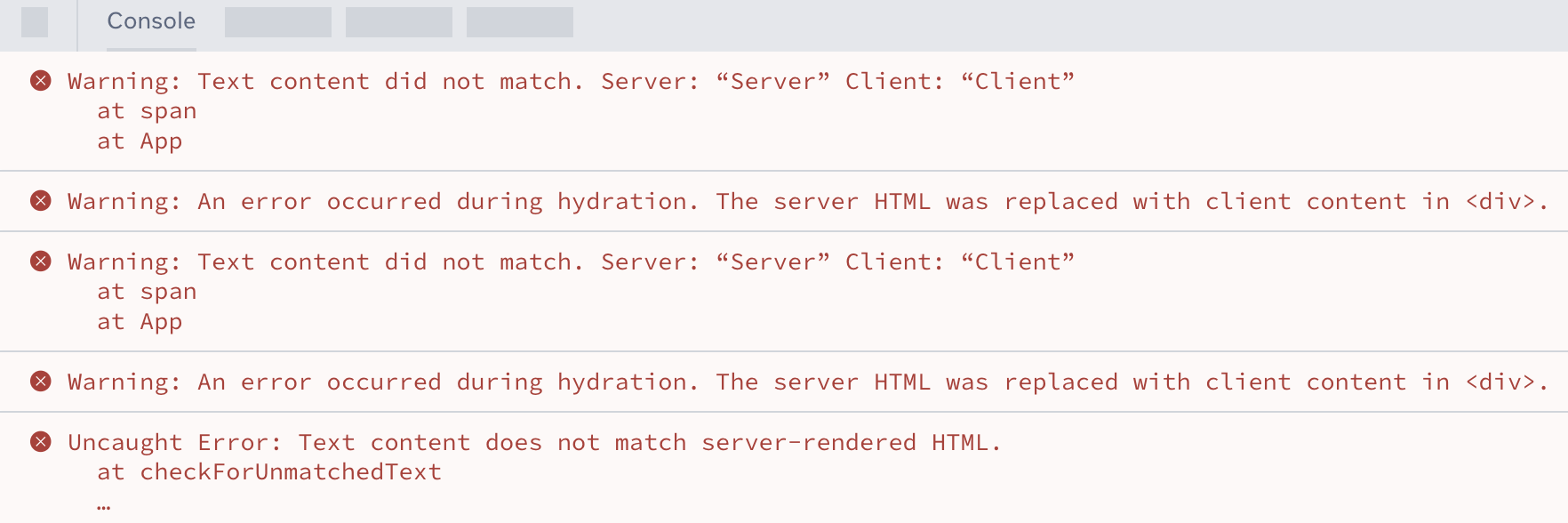
We now log a single message with the diff of the mismatch:
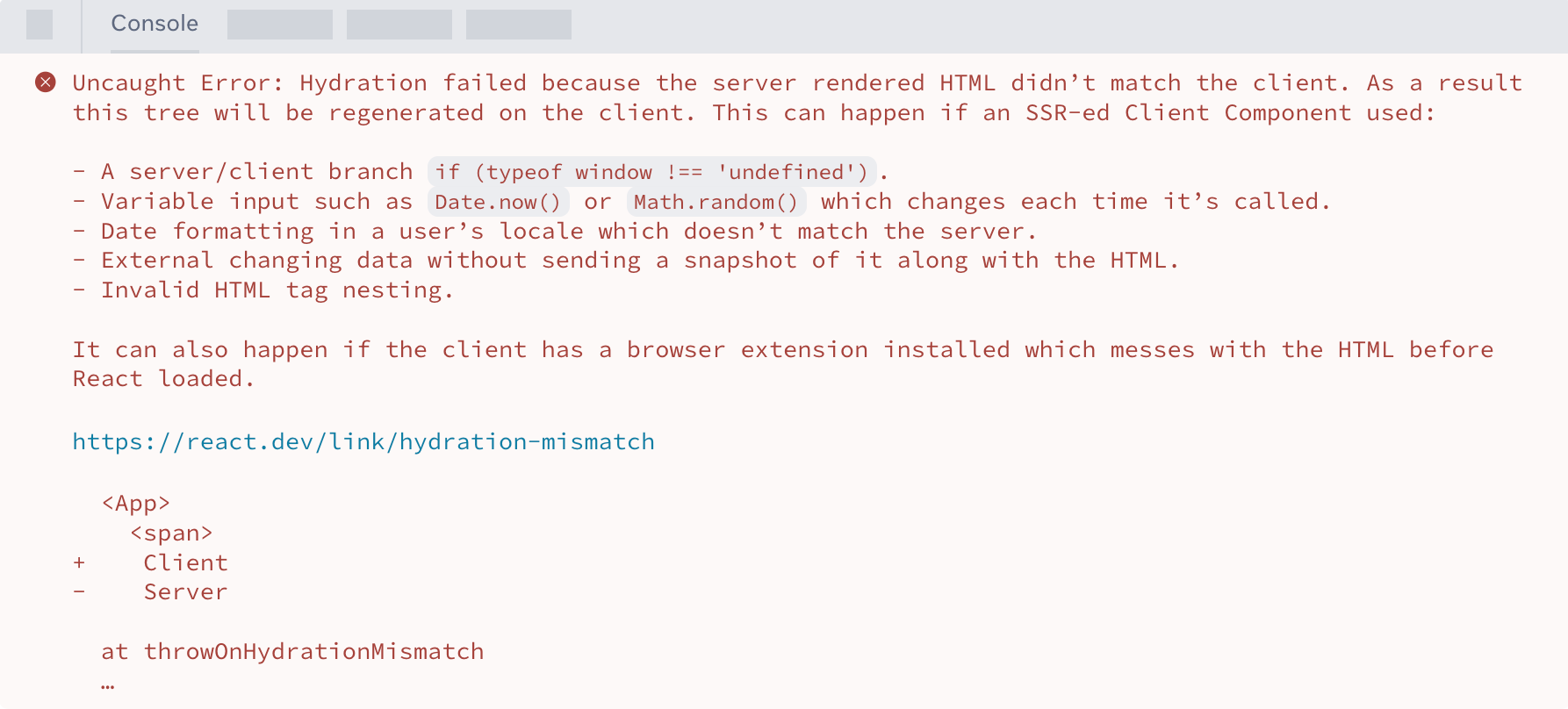
<Context> as a provider
In React 19, you can render <Context> as a provider instead of <Context.Provider>:
const ThemeContext = createContext('');
function App({children}) {  return (    <ThemeContext value="dark">      {children}    </ThemeContext>  ););}
The new Context provider can be used with <Context> and we will publish a codemod to convert existing providers. In future versions we will deprecate <Context.Provider>.
Cleanup functions for refs
We now support returning a cleanup function from ref callbacks:
<input  ref={(ref) => {    // ref created
    // NEW: return a cleanup function to reset    // the ref when element is removed from DOM.    return () => {      // ref cleanup    };  }}/>
When the component unmounts, React will call the cleanup function returned from the ref callback. This works for DOM refs, refs to class components, and useImperativeHandle.
Note
Previously, React would call
reffunctions withnullwhen unmounting. If yourrefreturns a cleanup function, React will now skip this step.In future versions, we will deprecate calling refs with
nullwhen unmounting.
Due to the introduction of ref cleanup functions, returning anything else from a ref callback will now be rejected by TypeScript. The fix is usually to stop using implicit returns, for example:
- <div ref={current => (instance = current)} />+ <div ref={current => {instance = current}} />The original code returned the instance of HTMLDivElement and TypeScript wouldn’t know if it was supposed to return a cleanup function or if you didn’t want to return a cleanup function.
You can use the no-implicit-ref-callback-return codemod to fix this pattern.
useDeferredValue initial value
We’ve added an initialValue option to useDeferredValue:
function Search({deferredValue}) {  // On initial render the value is ''.  // Then a re-render is scheduled with the deferredValue.  const value = useDeferredValue(deferredValue, '');
  return (    <Results query={value} />  );}
When initialValue is provided, useDeferredValue will return it as value for the initial render of the component, and schedule a re-render in the background with the deferredValue returned.
For more information, see useDeferredValue.
Support for Document Metadata
In HTML, document metadata tags like <title>, <link>, and <meta> are reserved for placement in the document’s <head>. In React, the component that decides what metadata the app uses may be very far from where you render the <head>, or React does not render the <head> at all. In the past, these elements would need to be inserted manually in an effect, or via libraries like react-helmet, and required careful handling when server rendering a React app.
In React 19, we’re adding support for rendering document metadata tags natively in components:
function BlogPost({post}) { return ( <article> <h1>{post.title}</h1> <title>{post.title}</title> <meta name="author" content="Josh" /> <link rel="author" href="https://twitter.com/joshcstory/" /> <meta name="keywords" content={post.keywords} /> <p> Eee equals em-see-squared... </p> </article> );}When React renders this component, it will recognize the <title>, <link>, and <meta> tags, and automatically hoist them to the document’s <head>. By supporting these metadata tags natively, we’re able to ensure they work with client-only apps, streaming SSR, and Server Components.
Note
You might still want a metadata library
For simple use cases, rendering a tag as document metadata can be suitable, but libraries can offer more powerful features like overriding generic metadata with specific metadata based on the current route. These features make it easier for frameworks and libraries like
react-helmetto support metadata tags, rather than replacing them.
For more information, see the docs for <title>, <link>, and <meta>.
Support for Stylesheets
Because of style precedence rules, external linked stylesheets (<link rel="stylesheet" href="...">) and inline stylesheets (<style>...</style>) require careful positioning in the DOM. It’s difficult to build a stylesheet capability that allows composability within components, so users often end up loading all their styles far from the components that depend on them, or they use a style library which encapsulates this complexity.
In React 19, we’re addressing this complexity and providing even deeper integration with client concurrent rendering and server streaming rendering with built-in stylesheet support. If you tell React the precedence of your stylesheet, it will manage the insertion order of stylesheets in the DOM and ensure that the stylesheet (if external) is loaded before displaying content that depends on those style rules.
function ComponentOne() {  return (    <Suspense fallback="loading...">      <link rel="stylesheet" href="foo" precedence="default" />      <link rel="stylesheet" href="bar" precedence="high" />      <article class="foo-class bar-class">        {...}      </article>    </Suspense>  )}
function ComponentTwo() {  return (    <div>      <p>{...}</p>      <link rel="stylesheet" href="baz" precedence="default" />  <-- will be inserted between foo & bar    </div>  )}
During server side rendering, React will include the stylesheet in the <head>, which ensures that the browser will not paint until it has loaded. If the stylesheet is discovered late after we’ve already started streaming, React will ensure that the stylesheet is inserted into the client’s <head> before revealing the content of a Suspense boundary that depends on that stylesheet.
During client side rendering, React will wait for newly rendered stylesheets to load before committing the render. If you render this component from multiple places in your app, React will only include the stylesheet in the document once:
function App() { return <> <ComponentOne /> ... <ComponentOne /> // won't lead to a duplicate stylesheet link in the DOM </>}For users who are used to manually loading stylesheets, this is an opportunity to colocate their stylesheets with the components that depend on them, which enables better local reasoning and makes it easier to ensure you’re only loading the stylesheets you actually depend on.
Style libraries and style integrations with bundlers can also adopt this new capability, so even if you don’t directly render your own stylesheets, you can still benefit when your tools are upgraded to use this feature.
For more details, read the docs for <link> and <style>.
Support for async scripts
In HTML, normal scripts (<script src="...">) and deferred scripts (<script defer="" src="...">) are loaded in document order, which makes it challenging to render these scripts deep in your component tree. However, async scripts (<script async="" src="...">) load in arbitrary order.
In React 19, we’ve added better support for async scripts by allowing you to render them anywhere in your component tree, inside the components that actually depend on the script, without having to manage re-location and deduplication of script instances.
function MyComponent() {  return (    <div>      <script async={true} src="..." />      Hello World    </div>  )}
function App() {  <html>    <body>      <MyComponent>      ...      <MyComponent> // won't lead to duplicate script in the DOM    </body>  </html>}
In all rendering environments, async scripts will be deduplicated so that React will only load and execute the script once even if it is rendered by multiple different components.
In server-side rendering, async scripts will be included in the <head> and loaded after more critical resources that block painting, such as stylesheets, fonts, and image preloads.
For more details, read the docs for <script>.
Support for preloading resources
During initial document load and on client-side updates, telling the browser about resources that it might need to load as early as possible can have a dramatic effect on page performance.
React 19 includes a number of new APIs for loading and preloading browser resources to make it as easy as possible to build great experiences that aren’t bogged down by inefficient resource loading.
import { prefetchDNS, preconnect, preload, preinit } from 'react-dom'function MyComponent() { preinit('https://.../path/to/some/script.js', {as: 'script' }) // loads and executes this script eagerly preload('https://.../path/to/font.woff', { as: 'font' }) // preloads this font preload('https://.../path/to/stylesheet.css', { as: 'style' }) // preloads this stylesheet prefetchDNS('https://...') // when you may not actually request anything from this host preconnect('https://...') // when you will request something but aren't sure what}<!-- the above would result in the following DOM/HTML --><html> <head> <!-- links/scripts are prioritized by their utility to early loading, not call order --> <link rel="prefetch-dns" href="https://..."> <link rel="preconnect" href="https://..."> <link rel="preload" as="font" href="https://.../path/to/font.woff"> <link rel="preload" as="style" href="https://.../path/to/stylesheet.css"> <script async="" src="https://.../path/to/some/script.js"></script> </head> <body> ... </body></html>These APIs can be used to optimize initial page loads by moving the discovery of additional resources like fonts out of stylesheet loading. They can also help make client-side updates faster by prefetching a list of resources that are expected for navigation, and then eagerly preloading those resources on click or hover.
For more details, see Resource Preloading APIs.
Compatibility with third-party scripts and extensions
We’ve improved hydration to account for third-party scripts and browser extensions.
During hydration, if an element that renders on the client does not match the element from the HTML on the server, React will force a client re-render to fix the content. Previously, if an element was inserted by a third-party script or browser extension, it would trigger a mismatch error and cause a client render.
In React 19, unexpected tags in <head> and <body> will be skipped, avoiding the mismatch errors. If React needs to re-render the entire document due to an unrelated hydration mismatch, it will leave the stylesheets inserted by third-party scripts and browser extensions in place.
Better error reporting
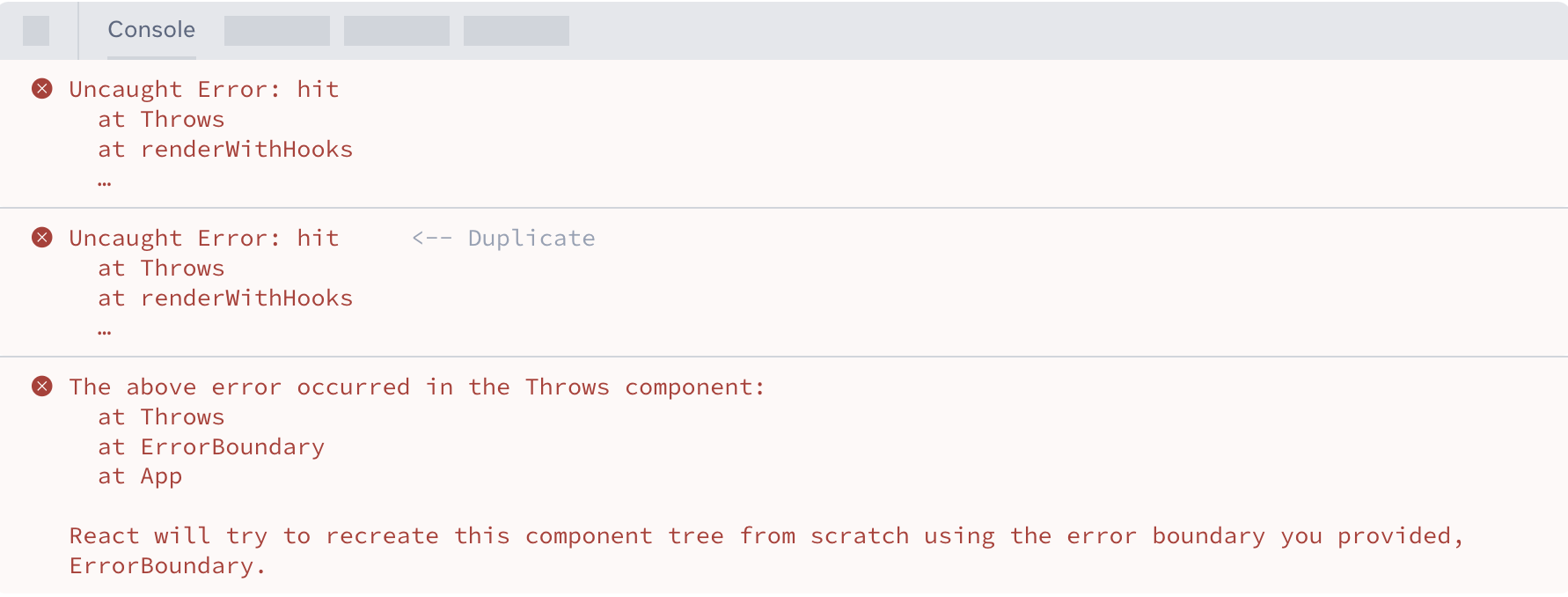
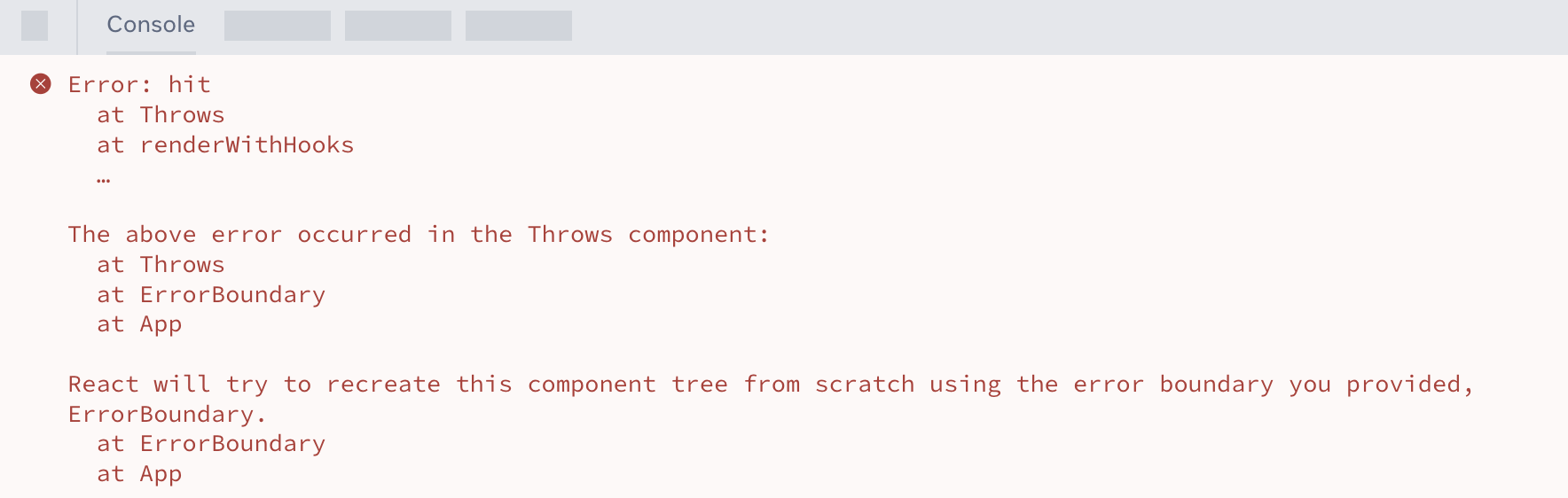
We’ve improved error handling in React 19 to reduce duplication and provide options for handling caught and uncaught errors. For example, when there’s an error during render that is caught by an Error Boundary, previously React would throw the error twice (once for the original error, once after failing to automatically recover), and then call console.error with info about where the error happened.
This resulted in three errors for every caught error:
In React 19, we log a single error with all the error info included:
Additionally, we’ve added two new root options to complement onRecoverableError:
onCaughtError: called when React catches an error in an Error Boundary.onUncaughtError: called when an error is thrown and not caught by an Error Boundary.onRecoverableError: called when an error is thrown and automatically recovered.
For more info and examples, see the docs for createRoot and hydrateRoot.
Support for Custom Elements
React 19 adds full support for custom elements and passes all tests on Custom Elements Everywhere.
In past versions, using custom elements in React has been difficult because React treated unrecognized props as attributes rather than properties. In React 19, we’ve added support for properties, which works on the client and during SSR with the following strategy:
- Server Side Rendering: props passed to a custom element will be rendered as attributes if they are primitive values like
string,number, or a value oftrue. Props with non-primitive types likeobject,symbol,function, or a value offalsewill be omitted. - Client Side Rendering: props that match properties on the custom element instance will be assigned as properties, otherwise they will be assigned as attributes.
Thanks to Joey Arhar for driving the design and implementation of Custom Element support in React.
How to upgrade
See the React 19 Upgrade Guide for step-by-step instructions and the full list of breaking and notable changes.
Note: This post was originally published on April 25, 2024, and updated to the stable release on December 5, 2024.
Original: https://react.dev/blog/2024/12/05/react-19#new-hook-useformstatus
The above translation was done by deepseek + manual proofreading