
Build a Tool Every Frontend Developer Has Used
/ 7 min read /
Table of Contents 目录
How to implement a local static file server similar to VSCode Live Server using Node.js. Build a basic server with the HTTP module, and enable live reload with the help of livereload and connect-livereload.
I’ve been systematically learning Node.js recently. When I got to the HTTP module, I wanted to write something to get familiar with the related APIs. So what should I write? Somehow I right-clicked and found it — I’m sure every frontend developer knows it well. It’s the plugin we all installed when we first started learning frontend: https://open-vsx.org/extension/ritwickdey/LiveServer. It helps us start a local development server with static and dynamic page live reload capabilities.
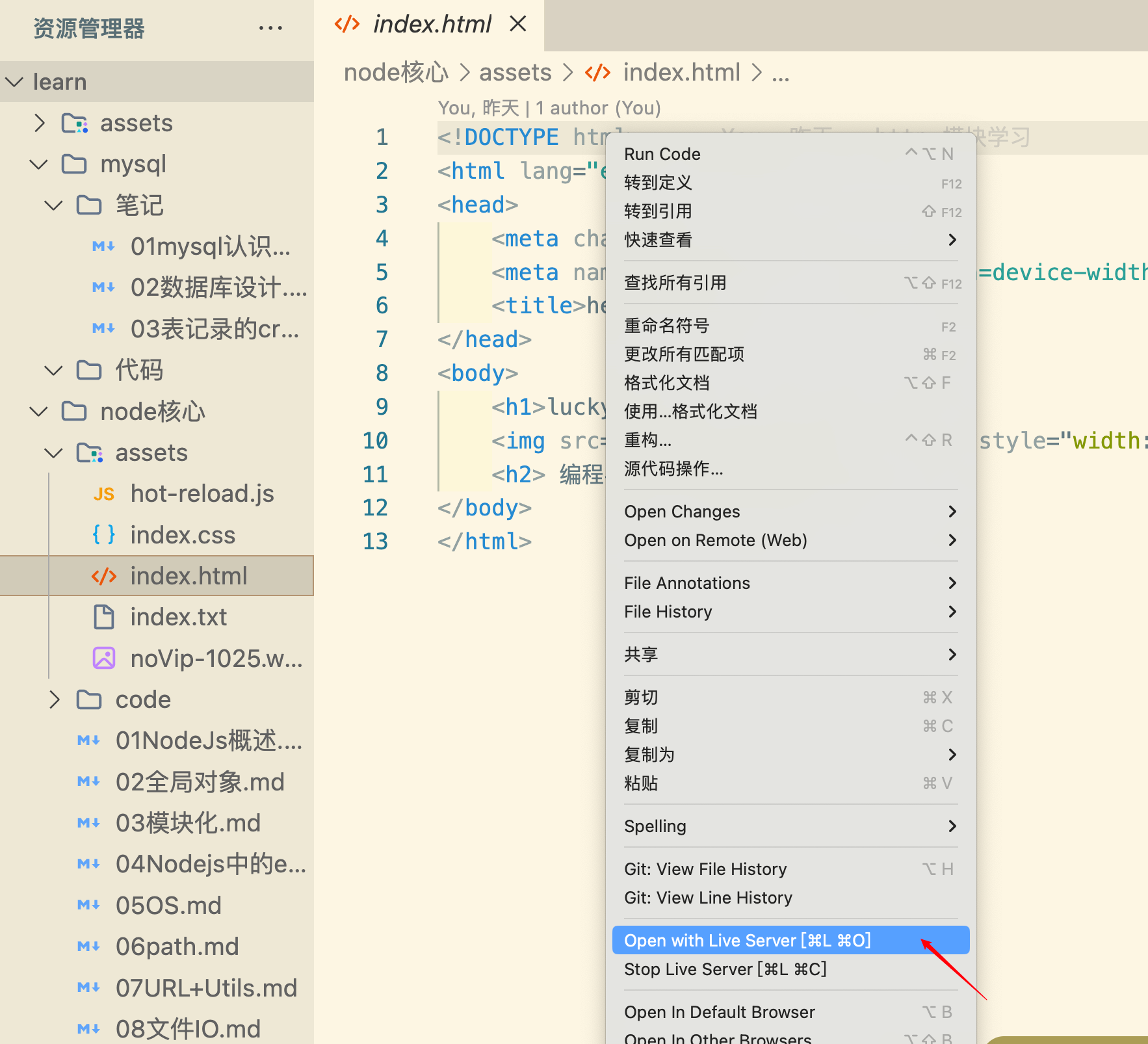
We usually use it to open our HTML files. Starting it this way has many benefits:
- Live preview: file changes automatically refresh the browser, supporting real-time updates for both static and dynamic pages.
- Solves the problem of not being able to access local files.
- Simple to use: one click to start the server.
This amazing capability is actually simple to implement. Today I’ll use Node.js to build a pared-down version of LiveServer.
Requirements Analysis
Let’s not rush into writing code. First, let’s analyze how to implement a minimal LiveServer — basically requirements analysis. Once we organize our approach, writing the code becomes natural and easy. There’s also a big advantage to doing this, which I’ll mention later. Implementation plan:
- Create an HTTP server.
- When the server starts, users visit different routes, which means accessing static resources from the corresponding local folder.
- First, we need to convert the URL path into a local resource path.
- Then check if the file exists. If it does, read and return it.
- If it doesn’t exist, check whether the path is a directory. If it’s a directory, check if there’s a default file
index.htmlunderneath. If it exists, return its contents; otherwise, return 404. - If it’s not a directory, same as file not found — return 404.
- That gives us a basic static file server, but a few details remain.
- Where should we place our static resources so they can be correctly read?
- How do we serve different file extensions in appropriate formats?
- How do we implement live reload so that updated static resources automatically reflect in the browser?
Feature Implementation
Now that we know what to do, let’s first write the initial code:
// Build local static file server
const http = require("http");const fs = require("fs");const path = require("path");
// Log requests and errors/** * Log requests and errors * @param {string} message - Message to log */const log = (message) => {    console.log(new Date().toISOString() + ': ' + message);};
/** * Resolve the request path and return the file path * @param {string} p - Request path * @returns {string} - Resolved file path */const resolvePath = (p) => {    // Remove leading /    const filePath = p.startsWith("/") ? p.slice(1) : p;    // Use assets folder as root directory    const fullPath = path.join(__dirname, "../assets", filePath);    // If file doesn't exist    if (!fs.existsSync(fullPath)) {        log(`File not found: ${fullPath}`);        return null;    }    return fullPath;};
/** * Get content type for a file * @param {string} filePath - File path * @returns {string} - Content type */const getContentType = (filePath) => {    const ext = path.extname(filePath);    switch (ext) {        case '.html': return 'text/html;charset=utf-8';        case '.css': return 'text/css;charset=utf-8';        case '.js': return 'application/javascript;charset=utf-8';        case '.json': return 'application/json;charset=utf-8';        default: return 'application/octet-stream';    }};
/** * Handle incoming requests and send appropriate responses * @param {*} req - HTTP request object containing headers, body, query parameters etc. * @param {*} res - Response object used to send data back to the client, allows setting status code and response data */const handler = (req, res) => {    const filePath = resolvePath(req.url);    if (filePath) {        // If file exists        if (fs.statSync(filePath).isFile()) {            // Read file            fs.readFile(filePath, (err, data) => {                if (err) {                    log(`Error reading file: ${filePath} - ${err.message}`);                    res.statusCode = 500;                    res.end('500 Internal Server Error');                    return;                }                // Set status code and response header                res.statusCode = 200;                res.setHeader("Content-Type", getContentType(filePath));                // Send response                res.end(data);            });            return;        } else if (fs.statSync(filePath).isDirectory()) {            // If it's a directory            // Use index.html as default file for the directory            const indexPath = path.join(filePath, "index.html");            if (fs.existsSync(indexPath)) {                // Read index.html                fs.readFile(indexPath, (err, data) => {                    if (err) {                        log(`Error reading index file: ${indexPath} - ${err.message}`);                        res.statusCode = 500;                        res.end('500 Internal Server Error');                        return;                    }                    // Set status code and response header                    res.statusCode = 200;                    res.setHeader("Content-Type", getContentType(indexPath));                    // Send response                    res.end(data);                });                return;            }        }    }    // If file doesn't exist    res.statusCode = 404;    res.setHeader("Content-Type", "text/html;charset=utf-8");    res.end("404 Not Found");};
const server = http.createServer(handler);
server.listen(3003, () => {    log('Server running at http://localhost:3003');});
This solves the first two issues: we agreed that the parent assets directory is where static resources live, so we need to place our static files there by convention; the getContentType function reads the extension of the requested resource and sets the Content-Type accordingly, allowing different resources to be displayed appropriately.
Now how do we implement live reload?
Live Reload
We need to install some dependencies. We’ll use livereload and connect-livereload, and build a static file server with Express. We’ll use livereload to create a server that watches for file changes, and the connect-livereload middleware to inject the LiveReload script into HTML files. That gives us a live static server.
const fs = require("fs");const path = require("path");const livereload = require("livereload");const connectLivereload = require("connect-livereload");const express = require("express");
// Create Express appconst app = express();
// Use connect-livereload middlewareapp.use(connectLivereload());
// Log requests and errorsconst log = (message) => {  console.log(new Date().toISOString() + ": " + message);};
// Resolve the request path and return the file pathconst resolvePath = (p) => {  const filePath = p.startsWith("/") ? p.slice(1) : p;  const fullPath = path.join(__dirname, "assets", filePath);  if (!fs.existsSync(fullPath)) {    log(`File not found: ${fullPath}`);    return null;  }  return fullPath;};
// Get content type for a fileconst getContentType = (filePath) => {  const ext = path.extname(filePath);  switch (ext) {    case ".html":      return "text/html;charset=utf-8";    case ".css":      return "text/css;charset=utf-8";    case ".js":      return "application/javascript;charset=utf-8";    case ".json":      return "application/json;charset=utf-8";    default:      return "application/octet-stream";  }};
// Handle incoming requests and send appropriate responsesapp.get("*", (req, res) => {  const filePath = resolvePath(req.url);  if (filePath) {    if (fs.statSync(filePath).isFile()) {      fs.readFile(filePath, (err, data) => {        if (err) {          log(`Error reading file: ${filePath} - ${err.message}`);          res.status(500).send("500 Internal Server Error");          return;        }        res.status(200).type(getContentType(filePath)).send(data);      });    } else if (fs.statSync(filePath).isDirectory()) {      const indexPath = path.join(filePath, "index.html");      if (fs.existsSync(indexPath)) {        fs.readFile(indexPath, (err, data) => {          if (err) {            log(`Error reading index file: ${indexPath} - ${err.message}`);            res.status(500).send("500 Internal Server Error");            return;          }          res.status(200).type(getContentType(indexPath)).send(data);        });      }    }  } else {    res.status(404).type("text/html;charset=utf-8").send("404 Not Found");  }});
// Create LiveReload server and watch the assets directoryconst liveReloadServer = livereload.createServer();liveReloadServer.watch(path.join(__dirname, "assets"));
// Start serverconst PORT = 3003;app.listen(PORT, () => {  log(`Server running at http://localhost:${PORT}`);});
If you want to try it out, remember to run npm init -y and install the dependencies: npm i express livereload connect-livereload
Now start it up — you’ve got a live static server.
Although this tool is simple, it covers a lot of knowledge:
- Building a server with the
httpmodule - Parsing request paths with
path - Using the
fsmodule to check and read files - Modularizing development by breaking down requirements, making code readable and understandable
- Finally, using two dependencies on top of Express to build a static file server
Lastly, if you feed our requirements analysis to an AI, it can probably generate the correct code too. In the AI era, understanding what you need and knowing how to use that knowledge to solve problems is especially important.