
The Event Loop in JavaScript - If you know front-end, you know how deep this rabbit hole goes!
/ 8 min read /
Table of Contents 目录
Some people say: “If you don’t understand the event loop, then you don’t know front-end at all.” Hearing that pissed me off. I may not understand the event loop, but I’ve completed so many requirements and written so much code—how could I not know front-end? No way, I’ve got to find out what this event loop thing really is, so I can argue back with whoever made that claim. Let’s take a look at what the event loop actually is!
What is the Event Loop?
The event loop is the working mode of the main rendering thread in the browser’s rendering process. When I first saw that description, I was completely confused. I knew it wasn’t simple, so I had to break down every part I didn’t understand and tackle them one by one. Let’s first see what the rendering process is ~
Rendering Process
Quick tip: The browser is multi-process and multi-threaded. It’s easy to understand: when you open one tab, other tabs aren’t affected, meaning each tab is its own process. Multi-threading is even simpler: under one tab process, there are network threads, rendering threads, etc.
Before talking about the rendering process, some people might not even know what a process is! For example, me. Actually, we can simply think of a process as: the “memory space” allocated for “program execution”. Think of it like making an iPhone. The steps to produce an iPhone are the program, and the Foxconn factory needed for production is the memory space. In the browser, a program also needs an isolated space to work. Let’s continue to understand the characteristics of a process:
- Every program (application) has at least one process.
- There can be multiple processes, each independent of each other. If they need to communicate, both must agree.
- Processes are isolated; if one crashes, it won’t affect other processes.
The rendering process is just an instance of a process, inheriting all its characteristics. It is one of the three major processes in the browser. Let’s look at these three important processes:
- Browser process: It is responsible for the Chrome browser’s UI (the global interface), user interaction, and child process management (at the start, only this process exists, but it spawns other processes).
- Network process: Loads network resources.
- Rendering process: Creates a main rendering thread, which is responsible for executing HTML, CSS, and JS.
Main Rendering Thread
The rendering process by default spawns a single main rendering thread. Some friends might not know what a thread is! That person is still me. A thread can be simply understood as: the “thing” that runs program code is the “thread”. Continuing with the iPhone production analogy: inside Foxconn (the process), there are many production lines—one for cameras, one for screens, etc. Each production line is a thread. A process has at least one thread (the main thread, which is created when the process starts). This is because memory space is precious; without a thread, the memory space (the process) would be released.
The relationship between processes and threads: A process can have multiple threads, threads run within the process, and threads within the same process share the process’s memory space and resources. Oh, and threads in the same process can execute concurrently (this will be useful later).
Why Does the Rendering Process Have Only One Main Thread? What Does the Main Rendering Thread Do?
Here are all the jobs of the main rendering thread:
- Parse HTML
- Parse CSS
- Compute styles
- Layout
- Process images
- Paint the page 60 times per second
- Execute global JS code
- Execute event handlers
- Execute timer callbacks
- …
So why doesn’t the rendering process use multiple threads to handle all these tasks, instead of giving them all to the main rendering thread? The main reasons are:
- JavaScript is single-threaded. If we had multiple threads, they could execute concurrently, which would require handling complex thread synchronization issues.
- Multiple threads could simultaneously manipulate the DOM, leading to race conditions.
- Consistency issues: the sequentiality and atomicity of DOM operations, the execution order of JavaScript code.
Now we know why a single main rendering thread handles so many tasks. But how can a single thread handle such complex synchronous and asynchronous programs without making the page freeze? Yes, the protagonist is about to appear: our powerful event loop mechanism, which ensures that the browser’s main thread never blocks.
The Event Loop Mechanism
Now let’s look at how the main rendering thread actually works—i.e., what the event loop mechanism really is!
At startup, the main rendering thread enters an infinite loop. Each iteration of the loop checks the message queue for any tasks. If there is a task, it executes it; if not, it goes to sleep. Other threads can add tasks to the message queue at any time (appending to the end of the queue). If a new task is added while the main rendering thread is sleeping, the main rendering thread gets woken up. When executing a task, the task itself may generate new tasks. This might be a bit hard to understand, so let me give an example:
setTimeout(function () { const loading = document.getElementById("loading") loading.addEventListener("click", function () { console.log("click loading"); });}, 1000);console.log(1)When this code runs, it creates a timer, which is an asynchronous task. It notifies the timer thread, handing the async task over to another thread, while the main thread continues executing the code below and prints 1. After 1 second, the timer thread adds the timer’s callback function to the message queue, and then the browser’s main thread sequentially executes tasks in the message queue.
Surely some clever friend will ask: Do tasks have priorities? In what order are tasks executed? Actually, tasks themselves have no priority, but each task has a task type. Tasks of the same type are all in one queue, and tasks of different types can belong to different queues (implication: different task types can be in the same queue). The “queue” here refers to the message queue—yes, the one the main rendering thread pulls tasks from. Different message queues have priorities. According to the W3C specification, the browser must have a microtask queue, and tasks in the microtask queue have priority over all other task queues.
What we call microtasks are in the microtask queue; macrotasks are in the other queues.
The main rendering thread uses asynchronous mechanisms to ensure it always executes synchronous tasks itself, while delegating async tasks to other threads. Those threads, after finishing their work, add tasks back to the message queue. By continuously consuming tasks from the message queue, the main rendering thread guarantees that it runs a huge number of tasks without freezing. Here’s a diagram of how the main rendering thread works:
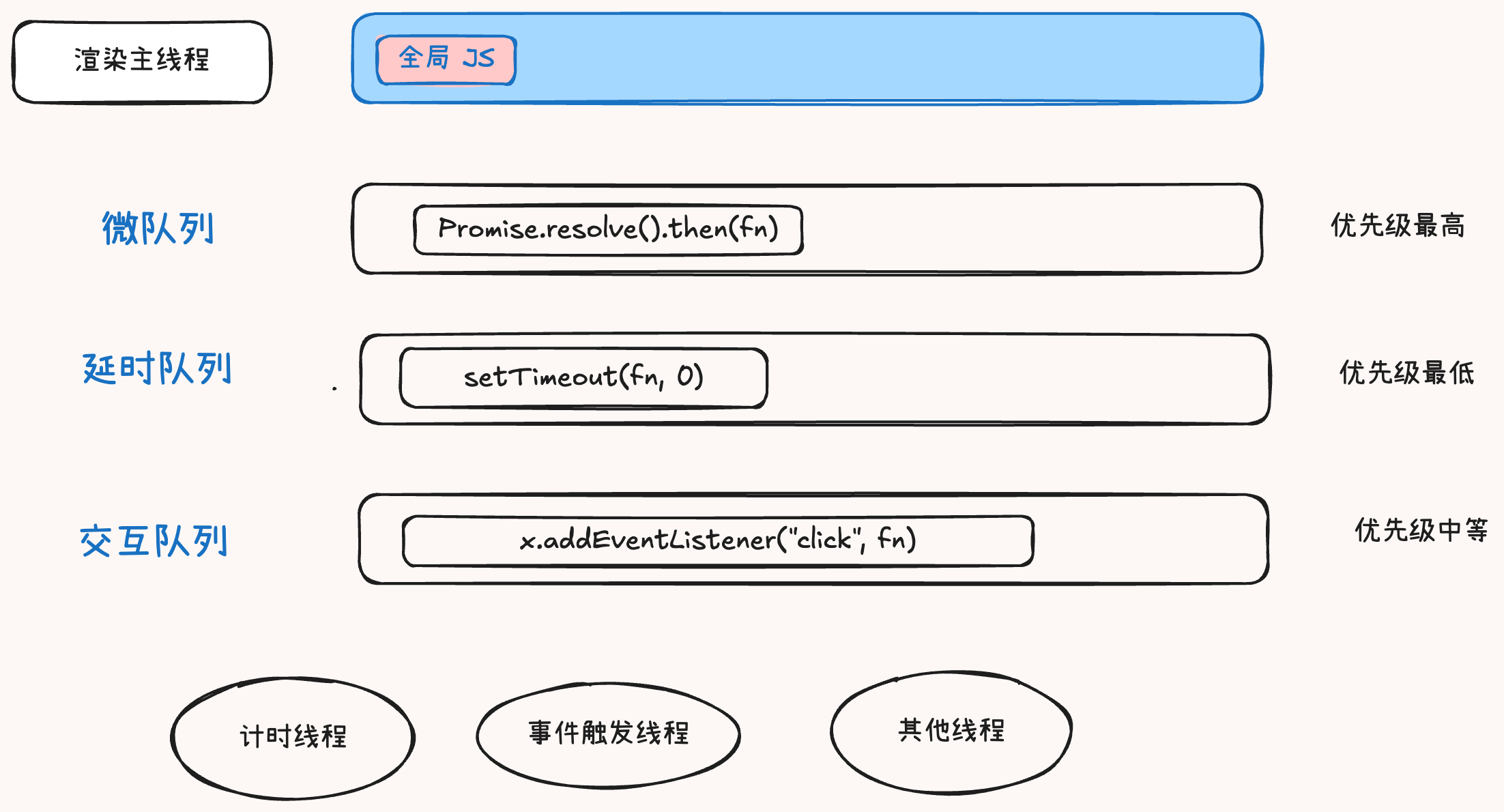
Let’s look at this code combined with the diagram above to better understand the event loop mechanism:
function delay(ms) {  var start = Date.now();  while (Date.now() - start < ms) {}}function f1() {  console.log(1);  Promise.resolve().then(function () {    console.log(2);  });}
setTimeout(function () {  console.log(3);  Promise.resolve().then(f1);}, 0);
Promise.resolve().then(function () {  console.log(4);});
document.addEventListener("click", function () {  console.log(6);});
delay(3000);
console.log(5);
After running, three seconds later it prints:
54312Using the knowledge above, we can analyze: the timer is added to the timer queue => Promise.resolve().then() is added to the microtask queue => the click listener is added to the interaction queue => the loop blocks for three seconds => prints 5 => picks up a task from the microtask queue and prints 4 => gets a task from the timer queue and runs the function, printing 3 => runs f1 from the microtask queue, printing 1 => runs the microtask again, printing 2 => when the click event fires, it eventually prints 6.
Why Learn the Event Loop?
At this point, the reason for learning the event loop is clear: the event loop is how the main rendering thread works, and all front-end work happens on the main rendering thread. So if you don’t understand the event loop, you really can’t claim to know front-end.
Interview Questions
Interview Question 1: Explain the JS event loop.
Reference Answer:
The event loop, also known as the message loop, is the working mode of the browser’s main rendering thread.
In Chrome’s source code, it starts an infinite for loop. Each iteration takes the first task from the message queue and executes it. Other threads only need to append tasks to the end of the queue at the appropriate time.
In the past, the message queue was simply divided into macro queues and micro queues. This classification is no longer sufficient for today’s complex browser environments, and has been replaced by a more flexible processing model.
According to the W3C specification, each task has a different type. Tasks of the same type must be in the same queue; tasks of different types can belong to different queues. Different task queues have different priorities. In a single event loop iteration, the browser decides which queue to fetch a task from. However, the browser must have a microtask queue, and tasks in the microtask queue always have the highest priority and must be scheduled and executed first.
Interview Question 2: Can timers in JS achieve precise timing? Why?
Reference Answer:
No, they cannot, because:
- Computer hardware does not have an atomic clock, so precise timing is impossible.
- The operating system’s timer functions inherently have small deviations; since JS timers ultimately call OS functions, they inherit those deviations.
- According to the W3C standard, when implementing timers, browsers impose a minimum delay of 4 ms if the nesting level exceeds 5 layers. This introduces bias for timeouts less than 4 ms.
- Due to the event loop, timer callbacks can only run when the main thread is idle, which adds further deviation.