
Next.js 14 Project Pitfall Log (Enterprise-Level Project)
/ 5 min read /
Table of Contents 目录
Background
While developing a Next.js project (one that’s actually making money), I ran into so many problems that I decided to devote a dedicated article to them — and I’ll keep updating it. You can find the latest version here: (link TBD).
Next.js Pitfalls
Most of the following are issues that caused production bugs. I’m sharing them so other Next.js developers can avoid the same traps.
Link Tag Auto-Prefetch
Official docs: https://nextjs.org/docs/app/api-reference/components/link#prefetch. The gist is that Link will prefetch the linked page’s data by default. There’s a small difference between static and dynamic routes, but from what I’ve tested, the prefetch logic fires once the Link enters the viewport.
I might be misremembering, but I was pretty sure Link didn’t prefetch before. Either way, having prefetch enabled by default is terrible design. This default behavior caused our production page to freeze. Our site needs SEO, so a single page can easily have 500+ Link tags. Meanwhile, the backend limits requests to 500 per second, so we ran straight into issues.
The fix: disable prefetch: <Link href="/dashboard" prefetch={false}>
Also, when you’re developing locally, have you noticed that Link navigation can be painfully slow? If you don’t prefetch, shouldn’t navigation be fast? But after building, Link navigation gets faster. This inconsistency between dev and production is incredibly confusing.
Issues with the Built-in Image Component
Discussion threads about Next.js Image:
- The built-in image optimization problem: https://www.reddit.com/r/nextjs/comments/1bhwyqg/anyone_else_have_problems_with_nextimage_on/ (Honestly a negative optimization — so unstable!)
- Build-time import issues: https://stackoverflow.com/questions/78194214/next-js-image-imports-stopped-working-after-updating-nextjs-from-14-0-1-to-14-1
Here are the problems I’ve personally encountered with Next.js Image:
-
If you use the Next.js framework and don’t use the Image component, it automatically warns you in the editor to use Image instead. Is that really okay?
-
If you need to convert a page to an image for download, you’d normally use
html2canvasordom-to-image. With Next.js Image, the images might not download properly. I have no idea why, but native<img>works fine. There’s no community solution for this either. -
When doing a static export globally, Image optimization fails — you have to add the
unoptimizedattribute. -
You must set width and height. Even with
fill, the parent element must have explicit dimensions and can’t usestaticpositioning. This is just infuriating. Does anyone have a good workaround?
Default Caching Behavior
Have you ever used Next.js’s fetch caching? In Next.js 14, the framework does a lot of caching by default: routes are static-rendered by default, data request results are cached by default, etc.
And in Next.js, there are at least 4 types of caches:
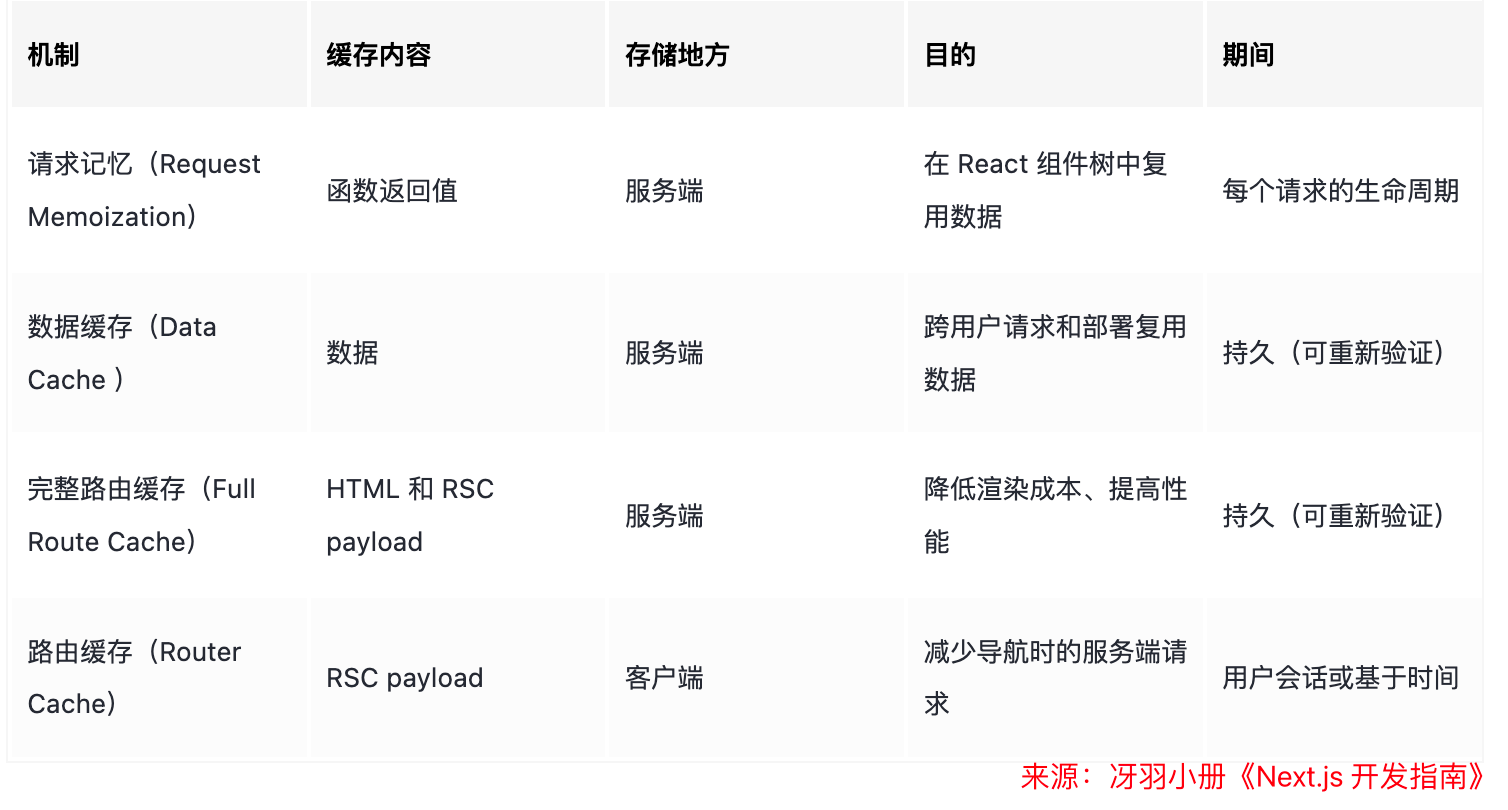
It’s impossible to remember them all — you have to constantly refer to the docs. And the caching configuration options are even more overwhelming. But framework features like this are unstable. In Next.js 15, the official team no longer caches fetch requests, GET route handlers, and client-side navigations by default. Doesn’t this make us developers look like clowns?
The above is just about the complexity of Next.js caching. The biggest issue is: caching causes inconsistent behavior between development and production. For example, when I’m developing locally with Next.js 14 and the backend API service has already stopped, I can still get some API responses. Isn’t that amazing? The backend is down, but I still receive data! After thinking about it, it must be the cache. This severely affects local development. Sometimes we might introduce bugs, but because of caching, we don’t catch them during development and release to production, causing problems. And since the caching strategy in dev differs from production, I have to build to verify my code — which is a terrible developer experience. For large projects, building takes a long time, so you end up wasting a lot of time waiting for builds just to verify.
Another niche pitfall: if your production environment uses a CDN, the serving domain might be A but the actual API domain is B. When using Server Actions to clear the cache, you’ll run into a domain mismatch. Fix:
experimental: { serverActions: { allowedOrigins: ["www.xxxx.com"], },},Using removeConsole Clears All Logs
Since removeConsole removes all console output, sometimes you want to log something on the Node side but keep the browser console clean. Workaround: use console.log for browser logs and a different method (like console.warn) for Node-side logs.
Root Layout layout.tsx is a Client Component — Cannot Export Metadata
If the root layout layout.tsx is a client component, none of the child page components can export Metadata for SEO. You have to export generateMetadata instead.
Inconsistency Between Dev and Production
There are many examples:
- Local development: Link navigation is slow, but fast after build.
- Local development: Requesting a Java backend is slow and sometimes times out, but not after build.
- Local development: Ant Design styles look fine, but after build, style precedence is messed up.
Using PM2 Deploy — CPU Hits 100%
I deployed the service on a 4‑core, 8GB server and used JMeter for load testing. With only 50 threads, CPU usage maxed out. I tried PM2 cluster mode, but it didn’t help. Since it’s hard to diagnose, I’m not sure if it’s our code or Next.js.
To Be Continued — I’ll Keep Updating
Thanks for reading. I’ve come to really appreciate a quote from Evan You: “A framework digs many deep and painful pits, then instead of filling them, relies on documentation to explain how to avoid them.” Is that really okay? Have you been sailing through Next.js without any issues?