
The Minimalist Agent Framework Pi That the Viral OpenClaw Relies On
/ 10 min read /
Hi everyone, I’m luckySnail. Today I’m sharing an article about the Agent framework Pi-mono that the wildly popular OpenClaw depends on.
Original article: https://lucumr.pocoo.org/2026/1/31/pi/
Author: Armin Ronacher
Date: January 31, 2026
Translation: Gemini 3 Pro. If you need a web translation plugin, I highly recommend ”🥥 Coconut Translator”
If you haven’t been living under a rock this week, you’ve probably noticed that a project by my friend Peter has gone viral on the internet. It goes by many names. The latest one is OpenClaw, but you might have seen it as ClawdBot or MoltBot depending on when you read about it. It’s an agent connected to your communication channel of choice, and its sole function is to run code.
What you might not be as familiar with is that underneath OpenClaw sits a small coding agent called Pi. Coincidentally, Pi is also pretty much the only coding agent I use these days. Over the past few weeks, I’ve become more and more of a “shill” for this little agent. After giving a talk about it recently, I realized I hadn’t written about Pi on this blog yet, so I felt it was necessary to provide some background on why I’m so fascinated by it and how it relates to OpenClaw.
Pi was written by Mario Zechner. Unlike Peter, who goes for that “sci-fi with a dash of crazy” style (note 1), Mario is very grounded. Despite their different approaches, OpenClaw and Pi follow the same philosophy: Large Language Models (LLMs) are really good at writing and running code, so we should lean into that. In some ways, I don’t think this is a coincidence, because Peter got both Mario and me hooked on this idea and on agents last year.
What is Pi?
Pi is a coding agent. There are many coding agents out there. Seriously, I think you could pick any one of them now and get a feel for what agentic coding is like. In the comments on this blog, I’ve spoken highly of AMP, and one of the reasons it resonated so strongly with me is that it really feels like a product built by people who are both deeply into agentic coding and have tried a bunch of different approaches to see what works, rather than just building a fancy UI around it.
Pi is interesting to me for two main reasons:
First, it has a minimal core. Its system prompt is the shortest I know of for any agent, and it has only four tools:
Read, Write, Edit, Bash.
Second, it compensates for this minimal core by providing an extension system that also allows extensions to persist state into the session, which is very powerful.
An added bonus: the code for Pi itself is exceptionally well-written. It doesn’t flicker, doesn’t consume much memory, doesn’t crash randomly, is very reliable, and is written by someone who genuinely cares about what software is.
Pi is also a collection of small components you can build your own agent on top of. That’s how OpenClaw was built, how I built my own small Telegram bot, and how Mario built his “mom.” If you want to build your own agent and connect it to something, just point Pi at itself and mom, and it will conjure one up for you.
What Pi does not have
To understand what Pi has, it’s more important to understand what Pi doesn’t have, why it doesn’t have it, and more crucially: why it never will. The most obvious omission is MCP support. It doesn’t have MCP support built-in. You can build an extension for it, or you can do what OpenClaw does to support MCP, which is to use mcporter. mcporter exposes MCP calls through a CLI interface or TypeScript bindings, and maybe your agent can do something with it. Or maybe not, I don’t know :)
This isn’t an omission born of laziness. It stems from Pi’s working philosophy. Pi’s core belief is that if you want your agent to do something it doesn’t currently know how to do, you don’t go download an extension or a skill. You ask the agent to extend itself. It champions the idea of writing code and running code.
This doesn’t mean you can’t download extensions. It’s fully supported. But instead of having to encourage you to download someone else’s extension, you can also just point your agent to an existing extension and say, “Build one like that thing over there, but with these modifications I like.”
A meta-framework for building agents
When you observe what Pi is doing, and OpenClaw as its extension, you see an example of software being as malleable as clay. This imposes certain requirements on its underlying architecture that, in many ways, set certain constraints on the system, and those constraints really need to be in the core design.
For instance, Pi’s underlying AI SDK is written in a way that a session can genuinely contain many different messages from many different model providers. It recognizes that session portability is somewhat limited between model providers, so it doesn’t over-rely on any model-provider-specific feature set that can’t be transferred to another provider.
Second, in addition to model messages, it maintains custom messages in the session file that extensions can use to store state, or that the system itself uses to maintain information that is either not sent to the AI at all or only sent partially.
Because of this system, and because extension state can also be persisted to disk, it has built-in hot-reloading so that the agent can write code, reload, test, and loop until your extension is actually functional. It also comes with documentation and examples that the agent itself can use to extend itself. Even better: sessions in Pi are tree-structured. You can branch within a session and navigate around, which opens up all sorts of interesting opportunities, like enabling a workflow where you do a side quest to fix a broken agent tool without wasting context in the main session. When the tool is fixed, I can roll the session back to an earlier point, and Pi will summarize what happened on that other branch.
All of this matters because, for example, if you consider how MCP works, on most model providers, MCP tools (like tools for any LLM) need to be loaded into the system context or its tools section at the start of the session. This makes it very difficult, if not impossible, to completely reload what a tool can do without breaking the entire cache or confusing the AI about why it was called differently before.
Tools outside of context
Extensions in Pi can register a tool for the LLM to call, and I find this useful from time to time. For example, despite my criticisms of Beads’ implementation, I do think giving an agent access to a todo list is a very useful thing. I use an agent-specific issue tracker that works locally, which I had my agent build for me. Because I also want the agent to manage todos, in this specific case, I decided to give it a tool instead of a CLI. It felt appropriate for the scope of the problem, and currently, this is the only extra tool I have loaded into my context.
But for the most part, what I add to my agent are skills or TUI extensions to make collaborating with the agent more pleasant for me. In addition to slash commands, Pi extensions can render custom TUI components directly in the terminal: spinners, progress bars, interactive file pickers, data tables, preview panels. The TUI is flexible enough that Mario proved you can run Doom inside it. It’s not practical, but if you can run Doom, you can definitely build a useful dashboard or debugging interface.
I’d like to highlight a few of my extensions to give you an idea of what’s possible. While you can use them as-is, the whole idea is really that you point your agent at an extension and remix it to your heart’s content.
/answer
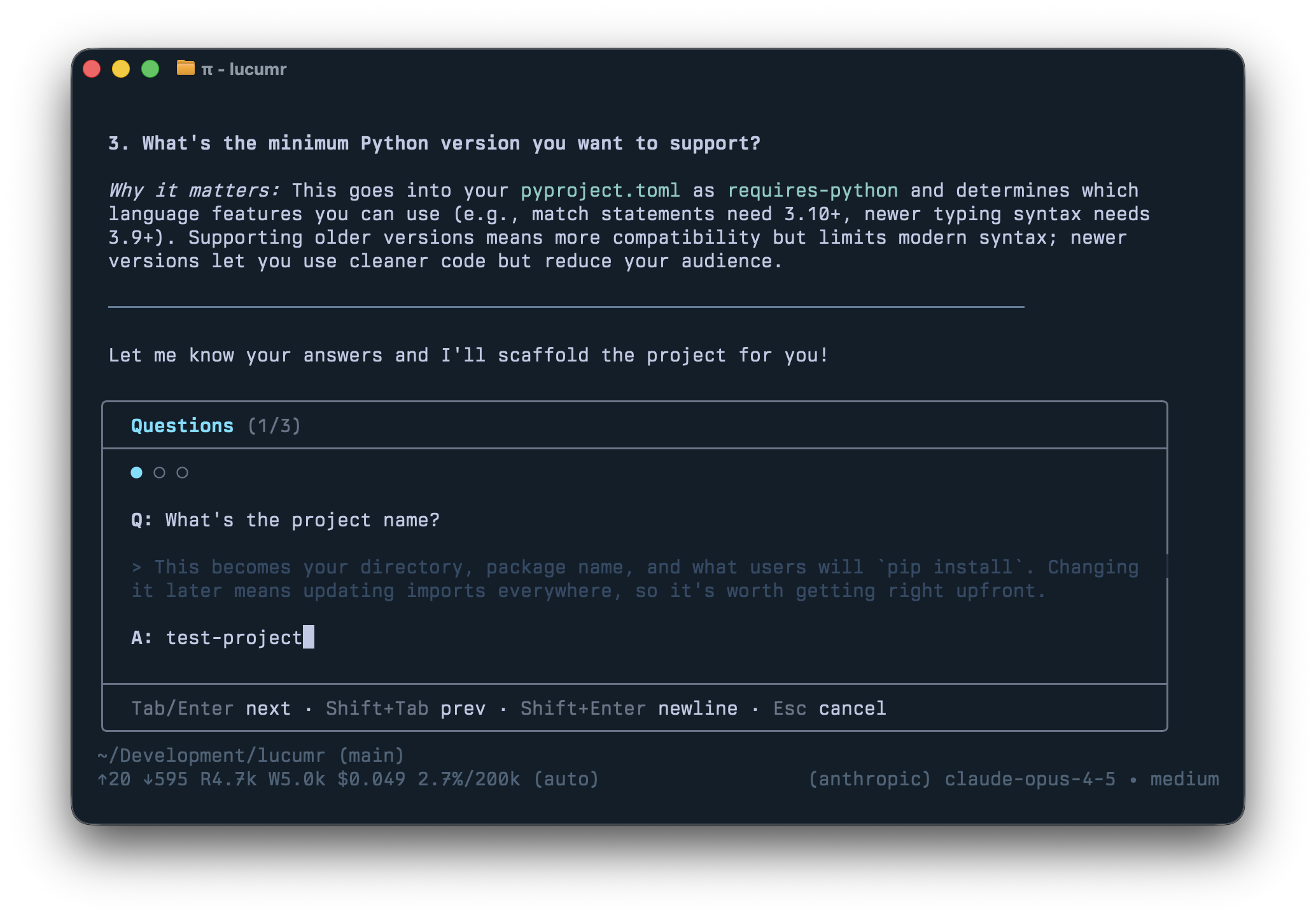
I don’t use a planning mode. I encourage the agent to ask questions, and there’s productive back-and-forth. But I don’t like the structured Q&A conversation that happens when you give an agent a “ask question” tool. I prefer the agent’s natural prose with explanations and diagrams interspersed.
The problem: answering questions inline gets messy. So /answer reads the agent’s last reply, extracts all questions, and reformats them into a nice input box.
/todos
Despite my criticism of Beads’ implementation, giving an agent a todo list is indeed very useful. The /todos command pulls up all entries stored in .pi/todos as markdown files. Both the agent and I can manipulate them, and the session can claim a task to mark it as in-progress.
youtube online demo: https://youtu.be/ZcKbzxziA5k?si=5jeP2QFsc4P0ILWu
/review
As more and more code is written by agents, there’s little point in throwing unfinished work at a human before the agent has reviewed it first. Because Pi sessions are tree-shaped, I can branch into a new review context, get findings, and then bring the fixes back into the main session.
The UI mimics Codex, providing easy-to-review commits, diffs, uncommitted changes, or remote PRs. The prompt focuses on the things I care about, so I get the kind of feedback I want (e.g., I ask it to highlight newly added dependencies).
/control
This is an extension I’m experimenting with but don’t use often. It allows one Pi agent to send a prompt to another. It’s a simple multi-agent system without complex orchestration, useful for experimentation.
/files
Lists all files changed or referenced in the session. You can reveal them in Finder, diff them in VS Code, quickly peek at them, or reference them in your prompt. Shift+Ctrl+R quickly peeks at recently mentioned files, which is handy when the agent generates PDFs.
Others have built extensions too: Nico’s sub-agent extension and interactive-shell, which lets Pi autonomously run interactive CLIs in an observable TUI overlay.
Software building software
These are just ideas about what you can do with your agent. The main point is that none of this was written by me; it was all created by the agent according to my specifications. I told Pi to make an extension, and it did. No MCP, no community skills, nothing. Don’t get me wrong, I use a lot of skills. But they are handmade by my “machine,” not downloaded from anywhere. For example, I completely replaced all my CLI or MCP tools for browser automation with a single skill that only uses CDP. Not because the alternatives didn’t work or were bad, but because it was simple and natural. The agent maintains its own functionality.
My agent has quite a few skills, and the key is that if I don’t need them, I throw them away. For example, I gave it a skill to read Pi sessions shared by other engineers, which helps with code reviews. Or I have a skill to help the agent write commit messages and commit behavior the way I want, and how to update changelogs. These started as slash commands, but I’m currently migrating them to skills to see if that works as well. I also have a skill hoping to help Pi use uv instead of pip, but I also added a custom extension to intercept calls to pip and python so they get redirected to uv.
Part of the charm of working with a minimal agent like Pi is that it gives you a hands-on experience with the idea of using “software that builds more software.” Pushing this to its extreme is when you remove the UI and output and connect it to your chat. That’s what OpenClaw does, and given its massive growth, I really feel more and more that this will, in some form, be part of our future.